





















Sorry, this item is temporarily out of stock.
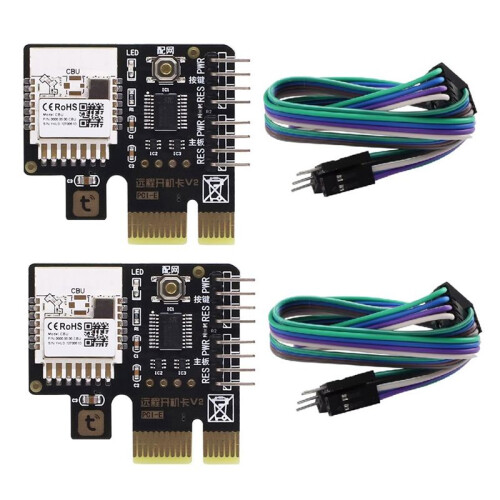
2Pcs Tuya Wifi PC Computer Power Desktop Computer Remote Boot Startup Card Telecommuting PICE Card
Would you like us to let you know when it's back?
Summary
- 1. Easy Installation: Standard PCIe port, work with most destop computer. Install to use, don't need any driver software.
- 2. App Remote Control: Control your computer on Tuya App anytime any where. Always know the computer status on App.
- 3. Wifi+Bluetooth: Computer Remote Boot Card support wifi and bluetooth connection. When wifi is disconnected, you can still control your PC on Tuya App through bluetooth connection, don't need any setup.
- 4. Voice Control: Work with Alexa Echo, Google Home Assistant, Yandex Alice, easy to control your PC with simple voice command.
- 5. Timer and Schedule: Set a timer to power on/off, or make a weekly schedule to power on/off the computer, automate your PC.
2Pcs Tuya Wifi PC Computer Power Desktop Computer Remote Boot Startup Card Telecommuting PICE Card Description
1. Easy Installation: Standard PCIe port, work with most destop computer. Install to use, don't need any driver software.
2. App Remote Control: Control your computer Tuya App anytime any where. Always know the computer status App.
3. Wifi+: Computer Remote Boot Card support wifi and connection. When wifi is disconnected, you can still control your PC Tuya App through connection, don't need any setup.
4. Voice Control: Work with Alexa Echo, Home Assistant, Yandex Alice, easy to control your PC with simple voice command.
5. Timer and Schedule: Set a timer to power /off, or make a weekly schedule to power /off the computer, automate your PC.
Reset And Force Reset: Not only "Power /off" function, it also support "Reset and Force Rest"function, avoid harm to your computer system.
NOTE: This product only work with Desktop PC, NOT work with laptop.
ATTENTION:
If the computer turn automatically after it's turned off. Here are the solutions:
(1) computer, go to WINDOWS settings and "Power Options", change the option "When Press Power button" to "Shut Down".
(2) computer, go to BIOS settings / Anvanced / APM Configuration, change the option "ErP Ready" to "Disabled" status.
(3) If your computer use "Wake Lan", please close it.
1. After installing this card, the power button PC case and App can be used at the same .
2. when you out for vacation or bussiness, the app will work 2/3/4G mobile network. You can control PC by app anywhere.
3. When wifi is offline, just need to open the phone , then you will be able to control the PC App.
4. It can be connected with wifi router directly. Don't need any gateway or hub.
Colour:Black
Material:PCB
Package Contents:
2 x computer boot card
2 x
Details
| OPC | PVKRMXT |
|---|---|
| Codes | 4711284656628 (EAN) |
Product Data
| Height | 4cm |
|---|---|
| Width | 6cm |
| Length | 9cm |
| Weight | 0.0285kg |
| Colour | Black |
| Material | PCB |