





















Product Images

Sorry, this item is temporarily out of stock.
Would you like us to let you know when it's back?
Summary
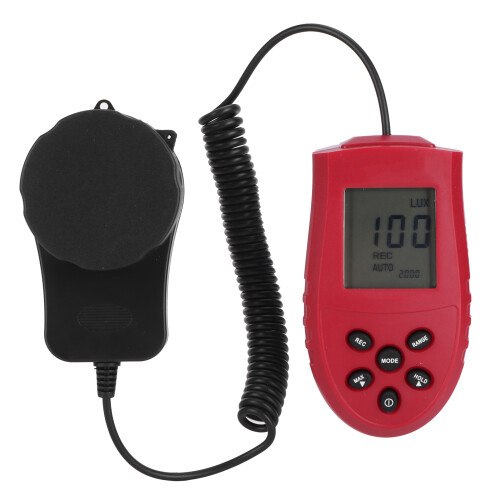
1、Wide measurement range, the measurement range is from 1 to 200,000 lx, Lx or FC unit switchable. 2、Maximum and minimum reading hold function. Compact in size and light in weight, you can carry it conveniently. 3、3 1/2 digit LCD display, measurement data display clear, convenient and intuitive observation. 4、Separate design of measuring head and display meter, suitable for measuring work in complex environment. 5、Widely used for monitoring light strength in homes, laboratories, office, schools, indoor farming, etc.Item Type: Luminometer Material: Plastic Color: As shown in the picture Weight: Approx.194g/6.8oz Unit of Measurement: Lx / FC unit Display Resolution: 0.1Lx/0.01FC Display: 3 1/2 digit LCD display Measuring Range: 1Lx-200,000Lx Sampling Rate: 2.0 times/sec Repeat Test: 2% Temperature Characteristics: 0.1%C Photosensitive Film: Photodiode with filter lens Power Supply: 2 x AAA batteries (not included) How to Use: 1. Power switch button: Press the power button to switch the power ON/OFF. 2. Maximum/minimum measurement selection button: Press the MAXIMUM button once, the LCD screen displays the "MAXIMUM" symbol, enter the maximum measurement function, only the maximum value during the measurement process is displayed; press again, the LCD screen displays the "MIN" symbol , Enter the minimum value measurement function, only the minimum value in the measurement process is displayed; press the MIN key again, the "MIN" symbol disappears, and the real-time measurement data is displayed. 3. Measurement data hold function key: Press the hold key once, the LCD screen displays the "8" symbol, the measurement data is locked, and the illuminance measurement cannot be performed; press the "8" key again to cancel the lock, the symbol disappears, and the illuminance is measured again. 4. Measurement gear conversion function button: Press the RANGE button repeatedly to realize the conversion measurement of different gears. When the "AUTO" symbol is displayed, it means that it is in the automatic range conversion function, and the corresponding gear can be automatically selected according to the measured light strength. When the "AUTO" symbol is not displayed, it means manual range conversion. When the measured light strength exceeds When the currently displayed range is displayed, the symbol "8" will be displayed. You need to manually press the RANGE key to enter the next larger range for measurement. 5. Instrument function setting key: Long press the MoDE key for more than 5 seconds to enter the Lx/FC measurement unit selection function, the LCD screen "Lx" symbol flashes, if you need to convert to FC measurement unit, press the HOLD key "FC" Flashing, the meter will display the measurement data in FC; on the contrary, if the LCD screen "FC" flashes, if you need to switch to the Lx measurement unit, press the MAXIMUM button, if the measurement unit has been selected, press the MODE button once , enter the data automatic recording parameter setting function.
Details
| OPC | PSS7CMN |
|---|---|
| Codes | 3050605541405 (EAN) |
| Product and Safety Information |
You'll only get instant Cashback at OnBuy! Enter your email below and we'll send you a copy of your basket to save you time later.
By entering your email address, you'll automatically be added to our database, where you can enjoy personalised Cashback offers and early access to our best deals. You can opt out of our emails at any time and we'll never share your details with anyone. Check our Privacy Policy and T&Cs to find out more.
Want access to personalised offers and the highest Cashback rates? Sign up to our emails below.
You can opt out of our emails at any time and we'll never share your details with anyone. Check our Privacy Policy and T&Cs to find out more.
This page has expired.
Refresh and continue