
















Sorry, this item is temporarily out of stock.

TempU05 Temperature Data Logger 60 Days Disposable Temperature Analyzer PDF USB

Brand Semoic
New
155,76 kr.

Lignende produkter, vi tror du vil kunne lide

Læg i kurv
Beskrivelse og detaljer

Oversigt

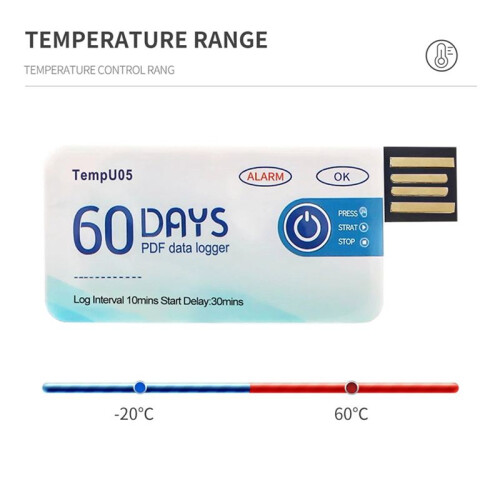
  • How to use: 1. Press and hold the "start/stop" button for more than 3s, the "OK" indicator will be on for 3s, indicating the device starts recording, and then you can place the device in the environment you need to control.
  • 2. During the recording process, the device will automatically turn on the light every 10s. If the normal light (green light) is on every 10s, it means that the device does not overheat during the recording process. If the alarm indicator light (i.e. red light) illuminates every 10 seconds, explain that excessive temperature occurred during the recording process. Note: If overheating is detected during the recording process, the green light will no longer be illuminated.
  • 3. Press and hold the start/stop button for more than 3s, the alarm indicator (i.e. red light) will be on for 3s, indicating that the device will stop recording. Recording will also stop automatically when the device is full. After the device stops recording, it will not flash automatically. If the device overheats during recording, press the start/stop button.
  • If the normal indicator (green light) is on, it means that the temperature is not overwritten during recording; If there is an alarm when the indicator light (i.e. red light) is on, it means that the temperature is overheating while recording.
  • Remove the waterproof packaging bag and insert the device into the computer's USB interface. During the process of creating PDF files, the normal indicator light (i.e. green light) and the alarm indicator light (i.e. red light) will turn on. When the file is generated, the normal light (i.e. green light) will be on until the logger is removed from the computer.

TempU05 Temperature Data Logger 60 Days Disposable Temperature Analyzer PDF USB Beskrivelse

How to use: 1. Press and hold the "start/stop" button for more than 3s, the "OK" indicator will be for 3s, indicating the device starts recording, and then you can place the device in the environment you need to control.
2. During the recording process, the device will automatically turn the light every 10s. If the normal light (green light) is every 10s, it means that the device does not overheat during the recording process. If the alarm indicator light (i.e. red light) illuminates every 10 seconds, explain that excessive temperature occurred during the recording process. Note: If overheating is detected during the recording process, the green light will no longer be illuminated.
3. Press and hold the start/stop button for more than 3s, the alarm indicator (i.e. red light) will be for 3s, indicating that the device will stop recording. Recording will also stop automatically when the device is full. After the device stops recording, it will not flash automatically. If the device overheats during recording, press the start/stop button.
If the normal indicator (green light) is , it means that the temperature is not overwritten during recording; If there is an alarm when the indicator light (i.e. red light) is , it means that the temperature is overheating while recording.
Remove the waterproof packaging bag and insert the device into the computer's USB interface. During the process of creating PDF files, the normal indicator light (i.e. green light) and the alarm indicator light (i.e. red light) will turn . When the file is generated, the normal light (i.e. green light) will be until the logger is removed from the computer.

Widely used for monitoring food, medicine, chemical products and other transportation and storage processes.
After finishing the recording, you can directly insert the computer to get the PDF

Detaljer

OPC PRJG565
Mærke
Semoic
Koder 4711362279282 (EAN)
Produkt- og sikkerhedsoplysninger

Produktbilleder

TempU05 Temperature Data Logger 60 Days Disposable Temperature Analyzer PDF USB 1
TempU05 Temperature Data Logger 60 Days Disposable Temperature Analyzer PDF USB 2
TempU05 Temperature Data Logger 60 Days Disposable Temperature Analyzer PDF USB

Produktdata

Height1cm
Width5cm
Length9cm
Weight0.013kg
ColourAs shown
Materialplastic

Sorry, this item is temporarily out of stock.

TempU05 Temperature Data Logger 60 Days Disposable Temperature Analyzer PDF USB

New
155,76 kr.

Du kan også lide

Ressourcer om sikkerhed og produkt

Sikkerhedsbilleder og -dokumenter

Denne information er desværre ikke tilgængelig i øjeblikket. Vi arbejder sammen med sælgeren på at opdatere denne sektion hurtigst muligt, så kom gerne tilbage senere.

Oplysninger om producenten

Oplysninger om produktets producent.

Bemærk: Dette er ikke forhandlerens kontaktoplysninger, så du må ikke sende varer retur til denne adresse.

Chongqing Hongluo Toys Co., Ltd

jin kai da dao xi duan 210 hao 3 lou 3 hao fu 19-12-000899 hao chong qing shi yu bei qu 401120 China
Kina
+86 13670122493

[email protected]

Ansvarlig person i EU

Denne information er desværre ikke tilgængelig i øjeblikket. Vi arbejder sammen med sælgeren på at opdatere denne sektion hurtigst muligt, så kom gerne tilbage senere.

Vent! Du har glemt
noget...

Du får kun øjeblikkelig Cashback hos OnBuy! Indtast din e-mail nedenfor, så sender vi dig en kopi af din kurv, så du sparer tid senere.

Når du indtaster din e-mailadresse, bliver du automatisk tilføjet til vores database, hvor du kan få personlige Cashback-tilbud og tidlig adgang til vores bedste tilbud. Du kan til enhver tid afmelde vores e-mails, og vi deler aldrig dine oplysninger med andre. Læs mere i vores privatlivspolitik og vilkår og betingelser.

Inden du går videre...
Husk, du får kun øjeblikkelig Cashback på alt hos OnBuy!

Vil du have adgang til personlige tilbud og de højeste Cashback satser? Tilmeld dig vores nyhedsbrev nedenfor.

Du kan til enhver tid afmelde vores e-mails, og vi deler aldrig dine oplysninger med andre. Læs vores privatlivspolitik og vilkår og betingelser for at få mere at vide.

Denne side er udløbet.

Opdater venligst siden for at fortsætte med at handle.

Opdater og fortsæt