
























Imágenes del producto

Sorry, this item is temporarily out of stock.
Would you like us to let you know when it's back?
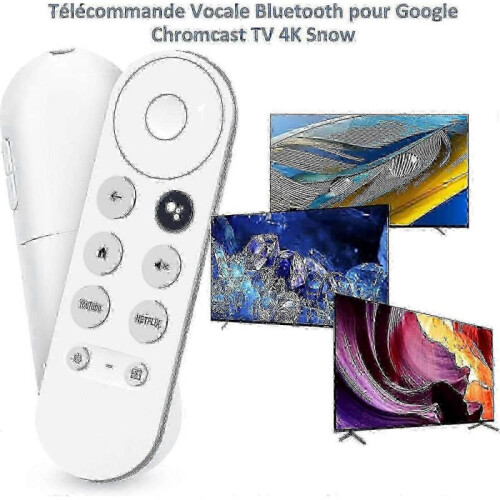
Applicable ModelsReplacement Google Remote Control for G9N9N, GA01409, GA01919, GA01920, GA01923, GA02463, GA02464. Its buttons and functions are almost the same as the original remote control and it is fully compatible with your TV. Replacement Google Remote ControlRemote control for Google Chromcast TV 4K Snow, Two quick access buttons provide quick access to your favorite NETFLIX and YouTube channels. You can use the other Google Assistant to control your TV. Voice Remote ControlAll operations can be controlled by voice. Using the Google Assistant button on the remote control, you can search for anything you want with voice commands. You can also use the remote control to control the volume and change the input source. Bluetooth Pairing MethodThe remote control has a Bluetooth voice function. Please make sure your TV also has Bluetooth function before using the voice function. Press and hold the "BACK" and "HOME" buttons at the same time until a flashing light appears on the remote control, then release them and your remote control is ready to use. NOTEThe Google Chromecast remote control contains the user manual. Please note that your Chromecast can only be connected to one device at a time. All Chromecast devices require a TV with built-in High-Bandwidth Digital Content Protection (HDCP) 1.3 or later. HDCP 2.2 is required to support 4K content. Remote control for Google Chromcast TV 4K Snow, applicable models G9N9N GA01409 GA01919 GA01920 GA01923 GA02463 GA02464. Its buttons and functions are almost identical to those of the original remote control and it is fully compatible with your TV. Remote control for Google Chromcast with two quick access buttons to your favorite NETFLIX and YouTube channels. You can also use other Google Assistants to control your TV and search for the content you want using voice commands. You can also use the remote to control the volume and change the input source. Pairing: The remote control has Bluetooth voice function. Before using the voice function, make sure that your TV also has Bluetooth function. Press and hold the BACK and HOME buttons at the same time until the flashing light appears on the remote control, then release them and the remote control is ready to use.
Detalles
| OPC | PNS2KKG |
|---|---|
| Marca | None |
| Códigos | 8247949083424 (EAN) |
| Información sobre el producto y seguridad |
Would you like us to let you know when it's back?
Google Chromecast 4K TV with Bluetooth Voice Remote - Snow White | Netflix &
¡Conseguirás Cashback instantáneo en OnBuy! Introduce tu correo electrónico aquí y te enviaremos una copia de tu cesta para que ahorres tiempo más adelante.
Al introducir tu dirección de correo electrónico, te añadiremos automáticamente a nuestra base de datos, donde podrás disfrutar de ofertas personalizadas de Cashback y acceso anticipado a nuestras mejores promociones. Puedes darte de baja de nuestros correos electrónicos en cualquier momento y nunca compartiremos tus datos con nadie. Consulta nuestra Política de Privacidad y nuestros Términos y Condiciones para obtener más información.
¿Quieres acceder a ofertas personalizadas y a las tasas de Cashback más altas? Suscríbete a nuestros correos electrónicos aquí.
Puedes darte de baja de nuestros correos electrónicos en cualquier momento y nunca compartiremos tus datos con nadie. Consulta nuestra Política de Privacidad y nuestros Términos y Condiciones para obtener más información.
Esta página ha caducado.
Actualiza y continúa