























Wireless Keyboard with Presspad for Microsoft/Surface Pro 7, Ultra-Slim 7 Color Backlight Bluetooth Wireless Keyboard
En stock
Pourquoi vous allez adorer OnBuy :
- Gagnez du Cashback sur chaque achat – dépensez-le immédiatement sur votre prochaine commande
- Livraison gratuite – sur des millions d'articles sur le site
- Les clients nous adorent – 137,000 avis avec une note « Excellente »
Les prix des articles vendus sur OnBuy incluent la TVA.
Options de paiement sans intérêts disponibles


Voir la description complète et les détails du produit
Livraison : Standard (3,90 €) | ven. 6 - ven. 13 nov.
Vendu par : Nixon
Retours : 30 jours
Protection des paiements pendant 180 jours
Vous pourriez aussi aimer
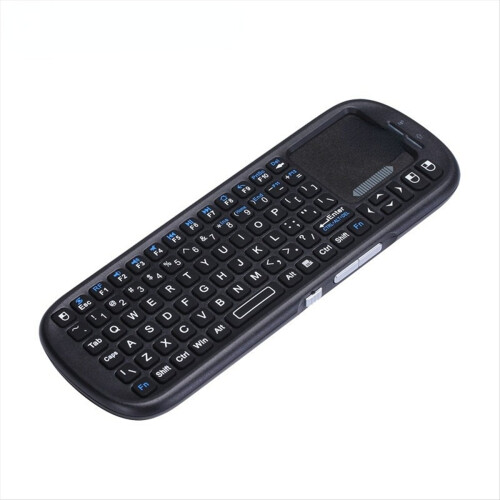


Description de Wireless Keyboard with Presspad for Microsoft/Surface Pro 7, Ultra-Slim 7 Color Backlight Bluetooth Wireless Keyboard
Wireless Keyboard with Presspad for Microsoft/Surface Pro 7, Ultra-Slim 7 Color Backlight Bluetooth Wireless Keyboard
Applicable system: The keyboard size is specially designed for Microsoft Surfac pro. The keyboard supports all Windows systems. You can also use this keyboard to pair with other electronic devices with Bluetooth and Windows systems, but pay attention to if it is used on other devices. The magnetic buckle of this product cannot be matched, it can only be used for Microsoft Surfac pro;
Make Surface pro3/surface Pro4/surface Pro5/surface pro6/surface Pro7 Like a Laptop:The keyboard is physically attached to Surface pro via magnetic like a laptop and the connection is though Bluetooth.After the Bluetooth is connected, mechanical keys and Presspad simply make you like using a laptop.(This keyboard doesn't fit for Surface go)
Slim and compact, yet performs like a traditional, full-size keyboard.Functional Media Keys and Presspad: Enjoy the easily control of your Surface pro,with the Presspad and the media hot keys,Keyboard with 7-color backlight night light effect.Charge up in 2 hour and enjoy 95 hours of uninterrupted use.Product Name: Wireless Keyboard / Bluetooth Keyboard.Applicable models: Microsoft surface pro3 / surface Pro4 / surface Pro5 / surface pro6 / surface Pro7
Use tutorial:1. Turn on the Bluetooth keyboard holster and push the switch in the lower right corner from [0FF to ON]. At this time, the holster keyboard starts, and the blue light shows off after 3 seconds.2. Then click the [Link key] / [connect key] next to it, and the blue light is on and the bluetooth light flashes.
3. Turn on the tablet and find-Settings-Turn on wireless and network-Turn on Bluetooth-Search for nearby devices-[Search the Bluetooth name of the protective case (Bluetooth keyboard)] and click Connect.4. The tablet screen prompts [Bluetooth pairing request (enter the Bluetooth password xxxx to pair ""Bluetooth keyboard"")], enter the number displayed on the screen o
Caractéristiques
- Keywords: Wireless, Bluetooth
Informations
| OPC | PTHJ2FM |
|---|---|
| Marque | unbrand |
| Codes | 9409192005533 (EAN) |
| Informations sur le produit et la sécurité |
Comparez les vendeurs de Wireless Keyboard with Presspad for Microsoft/Surface Pro 7, Ultra-Slim 7 Color Backlight Bluetooth Wireless Keyboard
- Neuf à partir de 53,34 €
| Vendeur | Notes | Garantie | Retours | Prix | Livraison | Total | Quantité |
|---|---|---|---|---|---|---|---|
|
Envoyé depuis :

|
(94 avis) | 1 mois |
30 jours
Retours gratuits Non
|
49,44 €
|
+3,90 € Delivery
Date de livraison estimée :
6-13 nov.
|
53,34 €
|
Gagnez en faisant vos achats avec du Cashback instantané sur tout.
Sans frais, sans engagement
- Versé sur votre compte OnBuy
- Utilisez-le pour votre prochain achat
- Économisez-le ou retirez-le
Rejoignez le programme cashback VIP
Un seul achat pour débloquer de meilleures offres et réductions