























Wireless Mouse for Air Mouse for Pro Air Laptop Windows Mouse for
Σε απόθεμα
Γιατί θα λατρέψεις τις αγορές στην OnBuy :
- Κέρδισε Επιστροφή Ποσού σε κάθε αγορά – ξόδεψε το άμεσα στην επόμενη παραγγελία σου
- Δωρεάν παράδοση – σε εκατομμύρια προϊόντα σε όλο το site
- Οι πελάτες μας λατρεύουν – 135,000 κριτικές με βαθμολογία « Άριστα »
Οι τιμές για τα είδη που πωλούνται από την OnBuy περιλαμβάνουν ΦΠΑ.
Διαθέσιμες άτοκες επιλογές πληρωμής


Δες την πλήρη περιγραφή & λεπτομέρειες του προϊόντος
Παράδοση: Προτεραιότητα (Δωρεάν) | Τετ 7 - Δευ 12 Οκτ
Πωλείται από: CNNOTEPAD
Επιστροφές: 30 ημέρες
Προστασία πληρωμής 180 ημερών
Μπορεί επίσης να σου αρέσουν


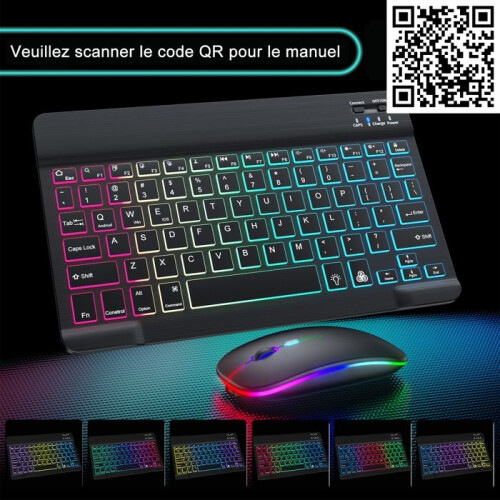
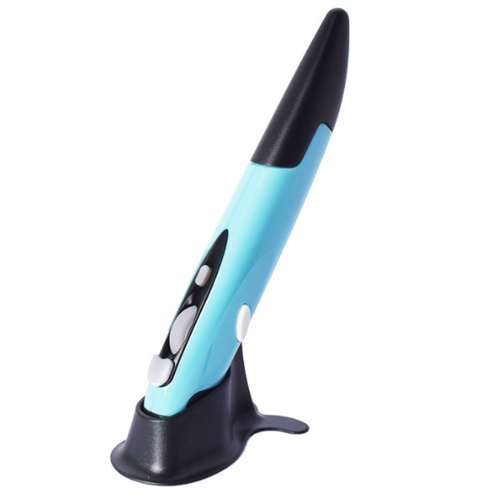
Περίληψη
- [Best compatible Bluetooth 4.0 chip]-Compatible with more than 99% Bluetooth devices. Connect for iPad 10.2 2019, for iPad 9.7 inches 2018, for iPad 9.7 2017, for iPad Pro 12.9 inches / 11.0 inches / 10.5 inches / 9.7 inches, for iPad Air 10.5 / Air 2, for iPad mini 5/ 4, for iPhone 11 Pro Max, for iPhone 11 Pro, for iPhone 11, for iPhone Xs Max, etc. PC, Macbook pro air 2012/2017/2018/2019 laptop, laptop, Mac OS; support Win7 Win8 Win10 Linux OS X or Android tablet
- Comfortable Contact and ultra-thin design: symmetrical and ergonomic design makes this wireless Bluetooth mouse suitable for left and right hands. Excellent surface coating technology brings you a Contact like skin. Ultra-thin and portable, the mouse can be used anytime and anywhere during travel. Very suitable for use at work/study/play.
- Mute click and adjustable DPI: The special silent design of the left and right buttons allows you to focus on work or playing games without disturbing others. Switch between DPI levels 800, 1200 and 1600 to meet your needs with high precision. Advanced optical tracking technology ensures greater sensitivity and can accurately track on various surfaces.
- Rechargeable and saving Erengy: The mouse has a built-in rechargeable battery with a charging cable. No need to replace the battery. In order to save power and long-term use, the mouse will automatically enter sleep mode after 11 minutes of inactivity, just click any button to wake it up.
- How to use a Bluetooth mouse: turn on the mouse switch, open the computer system preferences, and turn on the Bluetooth function. When the computer Bluetooth shows that it is searching for nearby Bluetooth devices, you need to hold down the "black button" at the bottom of the mouse and hold down 3-6 Seconds, then your computer will display the Bluetooth mouse when searching for the device, then click to connect it, and then successfully connect
Wireless Mouse for Air Mouse for Pro Air Laptop Windows Mouse for Περιγραφή
[Best compatible 4.0 chip]-Compatible with more than 99% devices. Connect for 10.2 2019, for 9.7 inches 2018, for 9.7 2017, for Pro 12.9 inches / 11.0 inches / 10.5 inches / 9.7 inches, for Air 10.5 / Air 2, for 5/ 4, for 11 Pro Max, for 11 Pro, for 11, for Xs Max, etc. PC, pro air 2012/2017/2018/2019 laptop, laptop, OS; support Win7 Win8 Win10 Linux OS X or Android tablet
Comfortable Contact and ultra-thin design: symmetrical and ergonomic design makes this wireless mouse suitable for left and right hands. Excellent surface coating technology brings you a Contact like skin. Ultra-thin and portable, the mouse can be used anytime and anywhere during travel. Very suitable for use at work/study/.
Mute click and adjustable DPI: The special silent design of the left and right buttons allows you to focus work or playing games without disturbing others. between DPI levels 800, 1200 and 1600 to meet your needs with high precision. Advanced optical tracking technology ensures greater sensitivity and can accurately track various surfaces.
Rechargeable and saving Erengy: The mouse has a built-in rechargeable battery with a charging cable. No need to replace the battery. In order to save power and long-term use, the mouse will automatically enter sleep mode after 11 minutes of inactivity, just click any button to wake it .
How to use a mouse: turn the mouse , open the computer system preferences, and turn the function. When the computer shows that it is searching for nearby devices, you need to hold down the "black button" at the bottom of the mouse and hold down 3-6 Seconds, then your computer will display the mouse when searching for the device, then click to connect it, and then successfully connect
How to update the software version? (Open for settings and click
Λεπτομέρειες
| OPC | PTPKZHM |
|---|---|
| Μάρκα | Tlily |
| Κωδικοί | 4711640039157 (EAN) |
| Πληροφορίες προϊόντος και ασφάλειας |
Στοιχεία Προϊόντος
| Height | 4cm |
|---|---|
| Width | 7cm |
| Length | 12cm |
| Weight | 0.1065kg |
| Colour | white |
| Material | ABS |
Σύγκρινε Πωλητές για Wireless Mouse for Air Mouse for Pro Air Laptop Windows Mouse for
- Νέο από 18,99 €
| Πωλητής | Αξιολογήσεις | Εγγύηση | Επιστροφές | Τιμή | Παράδοση | Σύνολο | Ποσότητα |
|---|---|---|---|---|---|---|---|
|
Αποστολή από:

|
(466 αξιολογήσεις) | - |
30 ημέρες
Δωρεάν επιστροφές Όχι
|
18,99 €
|
+Free Priority Delivery
Εκτ. Παράδοση:
7-12 Οκτ
|
18,99 €
|
Κέρδισε καθώς ψωνίζεις με άμεσο Cashback σε όλα.
Χωρίς παγίδες, χωρίς κόστος
- Καταβάλλεται στον λογαριασμό σας στο OnBuy
- Ξόδεψέ το στην επόμενη αγορά σου
- Αποθήκευσέ τα ή κάνε ανάληψη
Γίνετε Cashback VIP
Μόνο 1 αγορά ξεκλειδώνει μεγαλύτερες προσφορές και καλύτερα ποσοστά