
















Sorry, this item is temporarily out of stock.

VBand Multifunction CW Trainer Morse Key Trainer Vband Mobile Phone Computer Connector Code Trainer Telegraph Trainer B

New

Podobné produkty, ktoré by sa vám mohli páčiť

Pridať do košíka
Popis a podrobnosti

Zhrnutie

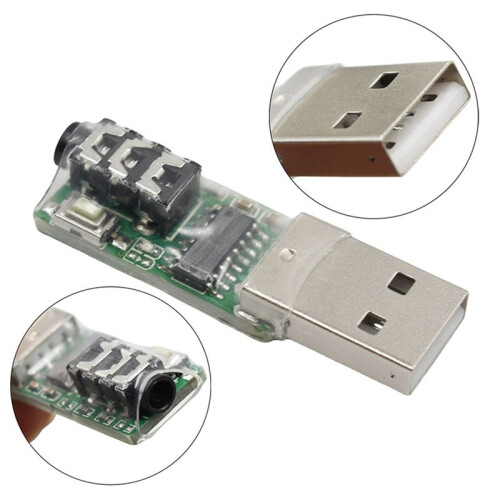
  • 1. B:USB interface: You can connect the computer through a mobile phone power cable, or you can connect the mobile phone through a data cable with dual B:USB interfaces. This trainer has built-in OTG circuit, so there is no need for OUG conversion.
  • 2. Electric key interface: You can directly connect the hand key and the automatic key. To connect the hand key, you need to connect the hand key first and then connect the mobile phone or computer. This device will intelligently identify the hand key or automatic key.
  • 3. Button: Used to switch between mode one and mode two. Press and hold this button to connect the computer or mobile phone to switch between the two modes. In mode one, this button can move the mouse logo. This function is especially important on mobile phones. Pressing and holding this button can move the mouse logo downward. Move to the bottom of the mobile phone screen and continue to hold this button, and the mouse logo will move upward from the bottom.
  • 4. Indicator light: Indicates the working status of the two states. The indicator light is always on in mode one, which is suitable for training software or APP operated by mouse, such as for Lakey, for Cwplayer, for MorseTrainer, etc.; the indicator light flashes in mode two, which is suitable for some special training software or APP, such as for Vband website, for MorseMania, for MorseIt, etc.
  • for VBand Morse USB C Trainer

VBand Multifunction CW Trainer Morse Key Trainer Vband Mobile Phone Computer Connector Code Trainer Telegraph Trainer B Popis

1. B:USB interface: You can connect the computer through a mobile phone power cable, or you can connect the mobile phone through a data cable with dual B:USB interfaces. This trainer has built-in OTG circuit, so there is no need for OUG conversion.
2. Electric key interface: You can directly connect the hand key and the automatic key. To connect the hand key, you need to connect the hand key first and then connect the mobile phone or computer. This device will intelligently identify the hand key or automatic key.
3. Button: Used to between mode one and mode two. Press and hold this button to connect the computer or mobile phone to between the two modes. In mode one, this button can move the mouse logo. This function is especially important mobile phones. Pressing and holding this button can move the mouse logo downward. Move to the bottom of the mobile phone screen and continue to hold this button, and the mouse logo will move upward from the bottom.
4. Indicator light: Indicates the working status of the two states. The indicator light is always in mode one, which is suitable for training software or APP operated by mouse, such as for Lakey, for Cwplayer, for MorseTrainer, etc.; the indicator light flashes in mode two, which is suitable for some special training software or APP, such as for Vband website, for MorseMania, for MorseIt, etc.

Colour:Photo Color
Material:plastic

Package Contents:
1 x CW Trainer Morse

Podrobnosti

OPC PY56QBG
Kódy 6031334998545 (EAN)
Informácie o produkte a bezpečnosti

Obrázky produktu

VBand Multifunction CW Trainer Morse Key Trainer Vband Mobile Phone Computer Connector Code Trainer Telegraph Trainer B 1
VBand Multifunction CW Trainer Morse Key Trainer Vband Mobile Phone Computer Connector Code Trainer Telegraph Trainer B 2
VBand Multifunction CW Trainer Morse Key Trainer Vband Mobile Phone Computer Connector Code Trainer Telegraph Trainer B

Údaje o produkte

Height3cm
Width7cm
Length7cm
Weight0.0185kg
ColourPhoto Color
SizeB
Materialplastic

Sorry, this item is temporarily out of stock.

VBand Multifunction CW Trainer Morse Key Trainer Vband Mobile Phone Computer Connector Code Trainer Telegraph Trainer B

New

Mohlo by sa vám tiež páčiť

Bezpečnostné a produktové zdroje

Bezpečnostné obrázky a dokumenty

Ľutujeme, tieto informácie momentálne nie sú k dispozícii. Spolupracujeme s predajcom, aby sme túto sekciu čo najskôr aktualizovali, preto sa sem prosím vráťte neskôr.

Informácie o výrobcovi

Ľutujeme, tieto informácie momentálne nie sú k dispozícii. Spolupracujeme s predajcom, aby sme túto sekciu čo najskôr aktualizovali, preto sa sem prosím vráťte neskôr.

Zodpovedná osoba v EÚ

Ľutujeme, tieto informácie momentálne nie sú k dispozícii. Spolupracujeme s predajcom, aby sme túto sekciu čo najskôr aktualizovali, preto sa sem prosím vráťte neskôr.

Počkajte! Na niečo ste
zabudli...

Okamžitý cashback získate iba na OnBuy! Zadajte svoj e-mail nižšie a pošleme vám kópiu vášho košíka, aby ste si ušetrili čas neskôr.

Zadaním svojej e-mailovej adresy budete automaticky pridaný do našej databázy, kde môžete využívať personalizované cashback ponuky a získať skorý prístup k našim najlepším akciám. Z odberu našich e-mailov sa môžete kedykoľvek odhlásiť a vaše údaje nikdy neposkytneme nikomu inému. Viac informácií nájdete v našich Zásadách ochrany osobných údajov a Obchodných podmienkach.

Neodchádzajte ešte...
Nezabudnite, okamžitý cashback získate len na OnBuy a na všetko!

Získajte prístup k ponukám šitým na miestu a najvyšším cashback sadzbám! Prihláste sa na odber našich e-mailov nižšie.

Z odberu našich e-mailov sa môžete kedykoľvek odhlásiť a vaše údaje nikdy neposkytneme nikomu inému. Viac informácií nájdete v našich Zásadách ochrany osobných údajov a Obchodných podmienkach.

Táto stránka vypršala.

Obnovte stránku, aby ste mohli pokračovať v nakupovaní.

Obnoviť a pokračovať