





















Obrázky produktu

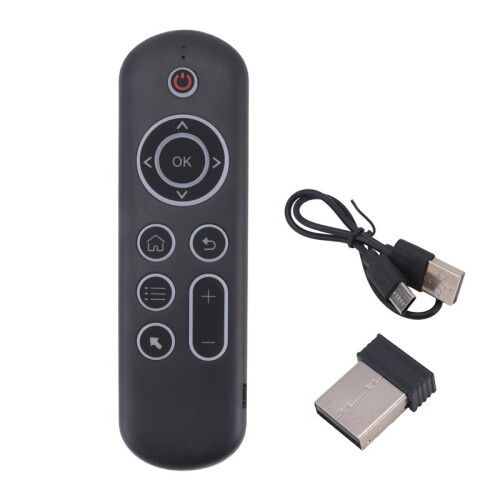
Sorry, this item is temporarily out of stock.
Would you like us to let you know when it's back?
Shrnutí
CPIADJUSTMENT: CPI ( Count Per Inch ). Speed of the Mouse Cursor.Adjustment ( 3 Levels ), 1, 2, 3 Level. The higher the level, the faster the speed. The default speed isset at level 2
1. Speed Increase: Press OK button + Volume + ] button for about 3seconds, the work indicator flashes quickly and thengoes off, release the button, CPI the basis of the increase 1 level
2. Speed Decrease: Press [ OK ] + olume - for about 3 seconds, thework indicator flashes quickly and then goes off, release the button, and CPI is reduced by 1 level onthe basis of the
2.4G MODE:
For initial use, plug a USB receiver into the USB port of device and waitfor 20-60 seconds to install driver of USB receiver. Move the mousethe mouse cursor can move the screen means that pairingis successful
if it is unsuccessful, press and hold [ OK and [ BACK ] buttons, LED light begin to flash. Pairing is successful when LED light stop flashing
BT 5.0 MODE:
1. Before using this device, first you must turn the BT function of thelain device
2. Then long press " OK + Return keys, when the LED turns to flashhe product enters the pre pairing
3. Click add search new devices the main device to find this airemotes name ( Example: BT-REMOTE ). Click the name can to connecting
4. After the product is successfully connected, the direction of themouse pointer can be controlled by waving in the air
5. If the connection is not successful, please perform the operationsteps of item 2-4 again
6. Reconn ent efficiency description: The normal reconnent of thiproduct is 3-5 seconds after it is normally paired with themain equipment
7. This product can only remember the pairing information of one maindevice, when the product is connected to a new device, theconnection of historical devices is not supported after
8. in this case. you need to delete the historical connection informationof thi
Podrobnosti
| OPC | PYF5Z2F |
|---|---|
| Kódy | 4711577181868 (EAN) |
| Informace o produktu a bezpečnosti |
Produktová data
| Height | 2cm |
|---|---|
| Width | 8cm |
| Length | 16cm |
| Weight | 0.089kg |
| Colour | Black |
| Material | plastic |
Okamžitý Cashback získáte pouze na OnBuy! Zadejte svůj e-mail níže a my vám pošleme kopii vašeho košíku, abyste ušetřili čas při dalším nákupu.
Zadáním své e-mailové adresy budete automaticky zařazeni do naší databáze, kde můžete využívat personalizované nabídky Cashback a získat přednostní přístup k nejlepším akcím. Z odběru e-mailů se můžete kdykoli odhlásit a vaše údaje nikdy nebudeme sdílet s nikým dalším. Více informací najdete v našich Zásadách ochrany osobních údajů a Obchodních podmínkách.
Chcete získat přístup k personalizovaným nabídkám a nejvyšším sazbám Cashback? Přihlaste se k odběru našich e-mailů níže.
Z odběru našich e-mailů se můžete kdykoli odhlásit a vaše údaje nikdy nebudeme sdílet s nikým dalším. Podrobnosti najdete v našich Zásadách ochrany osobních údajů a Obchodních podmínkách.
Tato stránka vypršela.
Obnovte stránku a pokračujte