





















Produktbilder

Sorry, this item is temporarily out of stock.
Would you like us to let you know when it's back?
Sammendrag
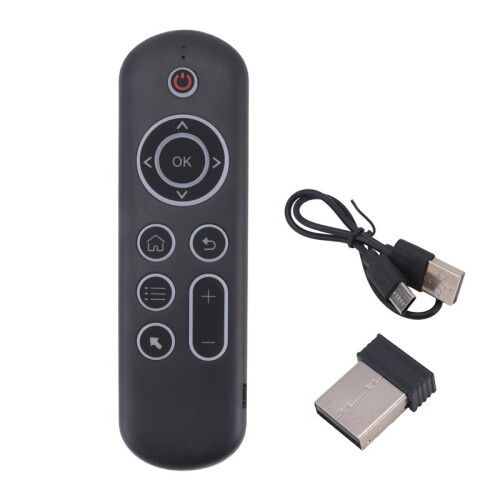
CPIADJUSTMENT: CPI ( Count Per Inch ). Speed of the Mouse Cursor.Adjustment ( 3 Levels ), 1, 2, 3 Level. The higher the level, the faster the speed. The default speed isset at level 2
1. Speed Increase: Press OK button + Volume + ] button for about 3seconds, the work indicator flashes quickly and thengoes off, release the button, CPI the basis of the increase 1 level
2. Speed Decrease: Press [ OK ] + olume - for about 3 seconds, thework indicator flashes quickly and then goes off, release the button, and CPI is reduced by 1 level onthe basis of the
2.4G MODE:
For initial use, plug a USB receiver into the USB port of device and waitfor 20-60 seconds to install driver of USB receiver. Move the mousethe mouse cursor can move the screen means that pairingis successful
if it is unsuccessful, press and hold [ OK and [ BACK ] buttons, LED light begin to flash. Pairing is successful when LED light stop flashing
BT 5.0 MODE:
1. Before using this device, first you must turn the BT function of thelain device
2. Then long press " OK + Return keys, when the LED turns to flashhe product enters the pre pairing
3. Click add search new devices the main device to find this airemotes name ( Example: BT-REMOTE ). Click the name can to connecting
4. After the product is successfully connected, the direction of themouse pointer can be controlled by waving in the air
5. If the connection is not successful, please perform the operationsteps of item 2-4 again
6. Reconn ent efficiency description: The normal reconnent of thiproduct is 3-5 seconds after it is normally paired with themain equipment
7. This product can only remember the pairing information of one maindevice, when the product is connected to a new device, theconnection of historical devices is not supported after
8. in this case. you need to delete the historical connection informationof thi
Detaljer
| OPC | PYF5Z2F |
|---|---|
| Koder | 4711577181868 (EAN) |
| Produkt- og sikkerhetsinformasjon |
Produktdata
| Height | 2cm |
|---|---|
| Width | 8cm |
| Length | 16cm |
| Weight | 0.089kg |
| Colour | Black |
| Material | plastic |
Du får umiddelbar Cashback kun hos OnBuy! Skriv inn e-posten din nedenfor, så sender vi deg en kopi av handlekurven din slik at du sparer tid senere.
Ved å oppgi e-postadressen din blir du automatisk lagt til i databasen vår, hvor du kan få personlige Cashback-tilbud og tidlig tilgang til våre beste tilbud. Du kan når som helst melde deg av e-postene våre, og vi deler aldri opplysningene dine med andre. Les vår personvernerklæring og vilkår og betingelser for å finne ut mer.
Vil du ha tilgang til personlige tilbud og de beste Cashback-ratene? Meld deg på nyhetsbrevet vårt nedenfor.
Du kan når som helst velge å ikke motta e-post fra oss, og vi deler aldri opplysningene dine med andre. Les vår personvernerklæring og våre vilkår og betingelser for å finne ut mer.
Denne siden har utløpt.
Oppdater og fortsett