





















Sorry, this item is temporarily out of stock.
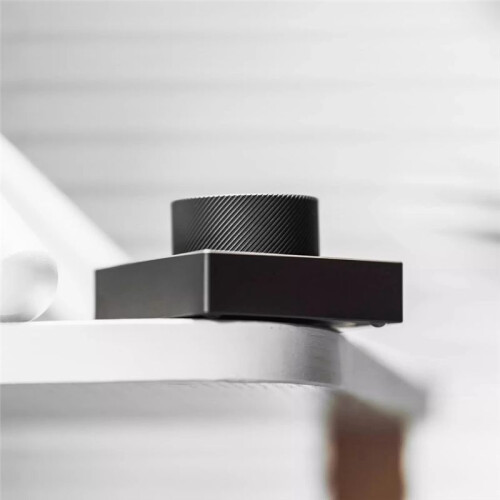
Desktop Knob Volume Tri-Mode 2.4G Wireless Wired Knob Customized Aluminium Alloy Control Knob C
Samankaltaiset tuotteet, joista uskomme sinun pitävän

Would you like us to let you know when it's back?
Yhteenveto
- Customizable desktop volume knob: Supports wired, Bluetooth, and 2.4G wireless connection modes. Default volume adjustment, mute, and screen brightness adjustment.
- Customize the button settings (basic buttons, combination keys, multimedia, RGB lighting settings, mouse) according to your usage habits through the software.
- Bluetooth connection method: Press any button to wake up. Search for the keyboard name "ANTICATER_MIN" on your computer and connect to it. If the keyboard name is not found, try pressing any button to wake up.
- Knob operation: Rotate left, rotate right, press the knob, press and hold to rotate left, press and hold to rotate right. Five different functions can be set.
- Knob function Default setting: Rotate left for "Volume -", rotate right for "Volume +", press for "Mute", press and hold to rotate left for "Screen Brightness -", press and hold to rotate right for "Screen Brightness +".
Desktop Knob Volume Tri-Mode 2.4G Wireless Wired Knob Customized Aluminium Alloy Control Knob C Kuvaus
Customizable desktop volume knob: Supports wired, , and 2.4G wireless connection modes. Default volume adjustment, mute, and screen brightness adjustment.
Customize the button settings (basic buttons, combination keys, multimedia, RGB lighting settings, mouse) according to your usage habits through the software.
connection method: Press any button to wake . Search for the keyboard name "ANTICATER_MIN" your computer and connect to it. If the keyboard name is not found, try pressing any button to wake .
Knob operation: Rotate left, rotate right, press the knob, press and hold to rotate left, press and hold to rotate right. Five different functions can be set.
Knob function Default setting: Rotate left for "Volume -", rotate right for "Volume +", press for "Mute", press and hold to rotate left for "Screen Brightness -", press and hold to rotate right for "Screen Brightness +".
Connection method: USB wired + + 2.4G wireless
Input voltage: 5V
Operating current: Approximately 4-6mA
Sleep current: Approximately 2uA
Wake- : Within 1 second
Battery capacity: 180-350mA
Ambient lighting: RGB (colorful)
Supported systems: Windows, Android, for macOS, for iOS.
Note:
1. When defining button functions, the keyboard and computer must be connected using a data cable.
2. For the first connection, the green light will display for 5 seconds after the connection is reset.
3. When the keyboard is set to continuous string output, the maximum setting is 18 characters.
4. When the keyboard is set to delayed output, the maximum delay is 1 minute.
5. Do not connect to a power supply exceeding 5V.
Color: C: Gunmetal Grey
Material: Aluminum Alloy
Package Contents:
1 * Desktop Knob
1 * Charging cable
1 * 2.4G receiver
Only the above package content, other products are not included.
Note: Light reflection andd
Tiedot
| OPC | PXVN6B7 |
|---|---|
| Koodit | 6031033219125 (EAN) |
| Tuote- ja turvallisuustiedot |
Tuotetiedot
| Height | 7cm |
|---|---|
| Width | 11cm |
| Length | 14cm |
| Weight | 0.2465kg |
| Colour | Gunmetal Grey |
| Material | Aluminum Alloy |
Would you like us to let you know when it's back?
Desktop Knob Volume Tri-Mode 2.4G Wireless Wired Knob Customized Aluminium Alloy Control Knob C
Saattaisit pitää myös näistä