





















Sorry, this item is temporarily out of stock.
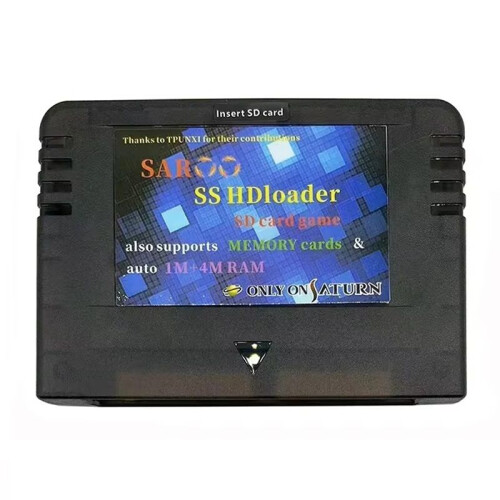
Burn Card SAROO SS HDLoader /TF Card Direct Reading to Saturn Console Games Without CD Arcade Normal Version
Would you like us to let you know when it's back?
Sammendrag
- NOTE:Not inculded TF card, You need bring your own TF card, you can download the saroo firmware from the forums and simply place the SAROO folder in the root directory of the TF card.
- The TF card supports FAT32 and exfat formats. The game image file needs to be in BIN/CUE format and needs to be placed in a folder format in an ISO file.
- It is recommended to use UltraISO software for image creation or format conversion.
- SAROO is an optical drive emulator that uses the SD card to enable disc-less gaming, with very fast game reading speeds!
- The color of the circuit board in the product is random due to different batches, and the sticker/silk screen/appearance may be different, which will not affect the use
Burn Card SAROO SS HDLoader /TF Card Direct Reading to Saturn Console Games Without CD Arcade Normal Version Beskrivelse
NOTE:Not inculded TF card, You need bring your own TF card, you can download the saroo firmware from the forums and simply place the SAROO folder in the root directory of the TF card.
The TF card supports FAT32 and exfat formats. The game image file needs to be in BIN/CUE format and needs to be placed in a folder format in an ISO file.
It is recommended to use UltraISO software for image creation or format conversion.
SAROO is an optical drive emulator that uses the card to enable disc-less gaming, with very fast game reading speeds!
The color of the circuit board in the product is random due to different batches, and the sticker/silk screen/appearance may be different, which will not affect the use
The latest 0.6 firmware:
1. Fix the bug that card will be corrupted occasionally.
2. Support games with multi-index tracks.
3. More flexible gameid matching method.
Can be accessed at url Website download.
The current version supports over 90% of most games.
Equipped with RAM card and memory card functions, supporting all RAM card games.
When running the game and encountering game lag, crashes, or abnormal background sound, the image should be changed to a different production or conversion software, other game versions can be changed, a higher speed TF card can be replaced, or the downloaded image should be checked for any issues using the Saturn emulator.
When playing multi disc games and encountering the inability to change discs, you can use the Saturn emulator to read records and change discs.
When the cartridge is inserted into the card slot of the machine and cannot start the menu, it is difficult to recognize the cartridge.
Insert the cartridge to the bottom and lift it a bit to the left or right, or use cards or other materials to cushion the front or back.
This is a common problem in the design of the machine's card slot. Please understand!
Colour:Transpare
Detaljer
| OPC | PV9QCWC |
|---|---|
| Koder | 6033986742125 (EAN) |
| Produkt- og sikkerhetsinformasjon |
Produktdata
| Height | 3cm |
|---|---|
| Width | 10cm |
| Length | 15cm |
| Weight | 0.12kg |
| Colour | Transparent Black |
| Material | plastic |