





















Produktbilleder

Sorry, this item is temporarily out of stock.
Would you like us to let you know when it's back?
Oversigt
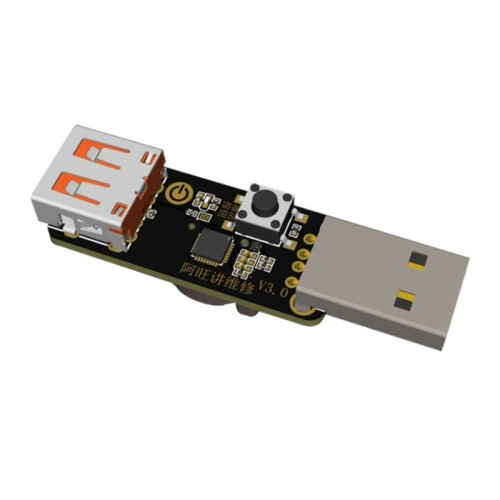
For HW Battery Unlock Tool
Method 1: Plug the device into an ammeter or power cable box with a USB port. Plug a three-wire power cable into the device output. Attach the battery clip of the power cable directly to the motherboard being repaired.
Method 2: While the device battery is charged, power the motherboard being repaired. Attach the two-wire power cable to the motherboard normally (the device does not need to be plugged in). Connect the device GND pin to the motherboard GND, and connect the I0 output pin to the motherboard battery connector IO pin.
Output supports both USB-A and Type-C . The microcontroller is powered by a 3V button battery.
Color: As Shown
Material: Plastic+Metal
Package Contents:
1 x Test Board
Detaljer
| OPC | PXW9PN5 |
|---|---|
| Koder | 6031220936026 (EAN) |
| Produkt- og sikkerhedsoplysninger |
Produktdata
| Height | 5cm |
|---|---|
| Width | 5cm |
| Length | 7cm |
| Weight | 0.06kg |
| Colour | As Shown |
| Material | Plastic+Metal |
Du får kun øjeblikkelig Cashback hos OnBuy! Indtast din e-mail nedenfor, så sender vi dig en kopi af din kurv, så du sparer tid senere.
Når du indtaster din e-mailadresse, bliver du automatisk tilføjet til vores database, hvor du kan få personlige Cashback-tilbud og tidlig adgang til vores bedste tilbud. Du kan til enhver tid afmelde vores e-mails, og vi deler aldrig dine oplysninger med andre. Læs mere i vores privatlivspolitik og vilkår og betingelser.
Vil du have adgang til personlige tilbud og de højeste Cashback satser? Tilmeld dig vores nyhedsbrev nedenfor.
Du kan til enhver tid afmelde vores e-mails, og vi deler aldrig dine oplysninger med andre. Læs vores privatlivspolitik og vilkår og betingelser for at få mere at vide.
Denne side er udløbet.
Opdater og fortsæt