





















Sorry, this item is temporarily out of stock.
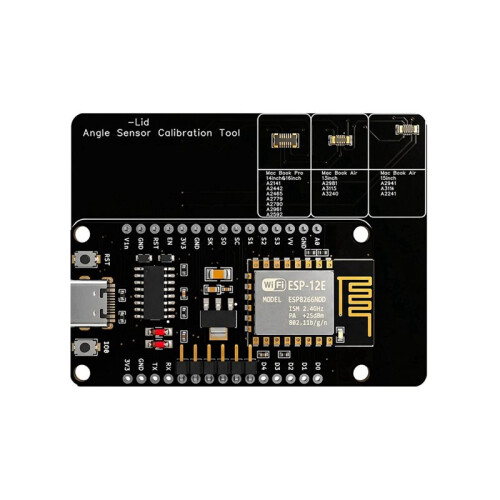
Angle Sensor Calibration Tool for A2141 A2442 A2485 A2779 A2780 A2681
Similar Products we think you'll like










Would you like us to let you know when it's back?
Summary
- This tool can be used to calibrate a for Macbook A2141. A2442 A2485 A2779 A2780
- Angle Sensor Calibration
- for Macbook Angle Senso
- for Macbook A2141 Sensor Tool
- Sensor Tool for Macbook
Angle Sensor Calibration Tool for A2141 A2442 A2485 A2779 A2780 A2681 Description
This tool can be used to calibrate a for A2141. A2442 A2485 A2779 A2780
First, briefly press the IO button to to the desired operating mode. The selected mode is indicated by the flashing of the LED (1, 2, and 3 respectively). Note: Calibration must be performed with the lid closed. In Mode 1, press and hold the IO button for one second to calibrate the PRO series (A2141, A2442, A2485, A2779, A2780). If calibration is successful, the LED will light for 3 seconds.
In mode 2, press the IO key for one second to calibrate the AIR series (A2681). If the calibration is successfully completed, the LED indicator will light for 3 seconds.
In mode 3, press and hold the IO button for one second to activate the sleep angle recognition function (if the lid is open, the LED lights ; when the lid is closed, the LED turns off).
(The product printed words may vary depending the batch, but this does not affect use)
Color: As Shown
Material: PCB
Package Contents:
1*Angle Sensor Calibration
Details
| OPC | PX5NW6K |
|---|---|
| Brand | Torribaly |
| Codes | 6031027772407 (EAN) |
Product Data
| Height | 6cm |
|---|---|
| Width | 8cm |
| Length | 8cm |
| Weight | 0.2kg |
| Colour | As Shown |
| Material | PCB |
Would you like us to let you know when it's back?
Angle Sensor Calibration Tool for A2141 A2442 A2485 A2779 A2780 A2681