





















Sorry, this item is temporarily out of stock.
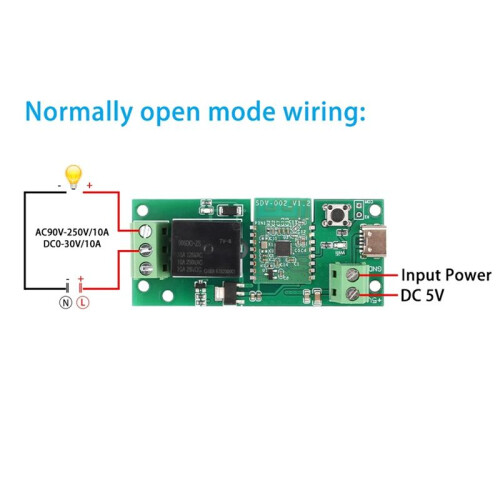
Ewelink USB-C 5V DIY Single Channel WIFI Inching Self-Locking Wireless Home Relay Module
Similar Products we think you'll like





Would you like us to let you know when it's back?
Summary
- 1. Easy to use, this WiFi control module does not require programming, just download an app and connect to the WiFi to control the built-in cloud, supporting 2.4G remote control.
- 2. With indicator light, with signal indicator light and relay closing indicator light.
- 3. Low power consumption, board power consumption less than 1W static current 80MA.
- 4. Supports wireless frequency, WiFi 2.4GHz b/g/n+Bluetooth, can be timed, delayed, and shared devices support multiple people controlling together or one person controlling multiple switches.
- 5. It has a wide range of applications and can be applied to smart homes, WiFi control, short distance remote control, etc. It can be connected to different types and brands of household appliances.
Ewelink USB-C 5V DIY Single Channel WIFI Inching Self-Locking Wireless Home Relay Module Description
1. Easy to use, this WiFi control module does not require programming, just download an app and connect to the WiFi to control the built-in cloud, supporting 2.4G remote control.
2. With indicator light, with signal indicator light and relay closing indicator light.
3. Low power consumption, board power consumption less than 1W static current 80MA.
4. Supports wireless frequency, WiFi 2.4GHz b/g/n+, can be timed, delayed, and shared devices support multiple people controlling together or one person controlling multiple switches.
5. It has a wide range of applications and can be applied to homes, WiFi control, short distance remote control, etc. It can be connected to different types and brands of household appliances.
Parameters:Input voltage: 5V or Type-C-5v
Maximum power: 2200W/10A
Wireless frequency: WiFi 2.4GHz b/g/n+
Working temperature: -20-70
Colour:green
Material:PCB+Components
Please check the following items before using this device:
1. Your smartphone or tablet is connected to a 2.4G WiFi that can access the internet (5G WiFi is currently not supported).
2. Turn your phone.
3. For phones or tablets using the Android system, the system must be version 4.0 or higher.
4. You must be able to access the and download the app when using an for phone or .
5. If your wireless router has set address filtering, please first enter the router background and turn off the filtering function.
Product Instructions:
① Search for "Ewelink" download and installation in major application markets.
② Connect the wires correctly according to the schematic diagram.
③ Power after completing the wiring. The device defaults to off for incoming calls and can be changed to or off for incoming calls in
Details
| OPC | PY5ZQRG |
|---|---|
| Codes | 6032220170373 (EAN) |
Product Data
| Height | 2cm |
|---|---|
| Width | 6cm |
| Length | 9cm |
| Weight | 0.028kg |
| Colour | Green |
| Material | PCB+Components |
Would you like us to let you know when it's back?
Ewelink USB-C 5V DIY Single Channel WIFI Inching Self-Locking Wireless Home Relay Module