






















Product Images

Sorry, this item is temporarily out of stock.


















Would you like us to let you know when it's back?
Summary
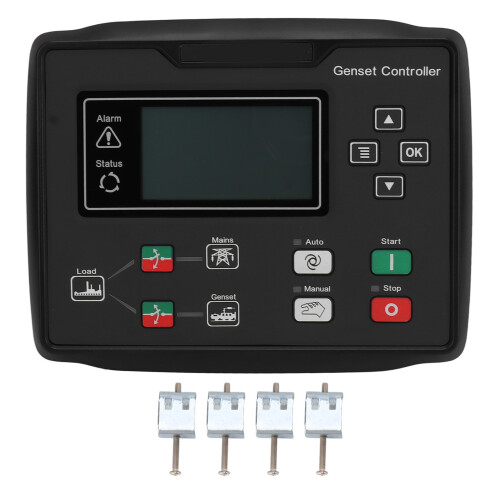
1、Anti Scratch Screen: The screen of this generator controller is made of hard screen premium material, which is good at abrasion and scratch resistance. 2、Liquid Crystal Display: With backlight, eight languages (Chinese, English, Spanish, Russian, Portuguese, Turkish, Polish, French) display, light touch button operation. 3、Silicone Panel: Made of silicone panel and keys, which has strong ability to adapt to high and low temperature of the environment and can be used for a long time. 4、Structural Design: Modular structural design, flame retardant plastic shell, pluggable terminals, embedded installation, compact structure, easy installation. 5、Good Protection: The rubber sealing area between the housing and the control panel is designed to achieve IP65 protection.Item Type: Generator Controller Weight: 764g / 26.9oz Material: Plastic, Silicone Product Size: Approx. 21x16.5x4.5cm / 8.3x6.5x1.8in Waterproof Grade: IP65 Applicable Model: For HQM6120UN Applicable: Diesel generator set Alternator Frequency: 50Hz 60Hz 3 phase 4 wire 15V AC - 360 V AC (ph N) 3 phase 3 wire 30V AC - 620 V AC (ph ph) 1 phase 2 wire 15 V AC - 360 V AC (ph N) 2 phase 3 wire 15V AC - 360 V AC (ph N) Key Description: Stop or Reset key: In both manual/automatic mode, it is possible to stop the running genset. In the genset alarm state, any stop alarm can be reset. In shutdown mode, press this key for more than 3s to test if the panel light is normal (test light). During a shutdown, press this key again for a quick shutdown. Power On Key: In manual mode or manual test mode, press this key to start the stationary generator set. Manual key: Press this key to put the controller in manual mode. AUTO key: Pressing this key puts the controller into automatic mode. Closing and breaking key: In manual mode, press this key to close and break the switch. Confirmation key: Move the cursor in the parameter setting and confirm the setting information. Flip up or increase: Flip the screen to move the cursor up or increase the number of the cursor position in the parameter setting. Flip down or decrease: Flip the screen to move the cursor downward or decrease the number of the cursor position in the parameter setting. Menu key: Press this key to enter the setting menu, press this key again to return to the main interface.
Details
| OPC | PSS85G9 |
|---|---|
| Codes | 3425658397666 (EAN) |
Would you like us to let you know when it's back?
Generator Controller Automatic Start Generator Controller With LCD Display for HQM6120UN 8‑35V
You'll only get instant Cashback at OnBuy! Enter your email below and we'll send you a copy of your basket to save you time later.
By entering your email address, you'll automatically be added to our database, where you can enjoy personalised Cashback offers and early access to our best deals. You can opt out of our emails at any time and we'll never share your details with anyone. Check our Privacy Policy and T&Cs to find out more.
Want access to personalised offers and the highest Cashback rates? Sign up to our emails below.
You can opt out of our emails at any time and we'll never share your details with anyone. Check our Privacy Policy and T&Cs to find out more.
This page has expired.
Refresh and continue