


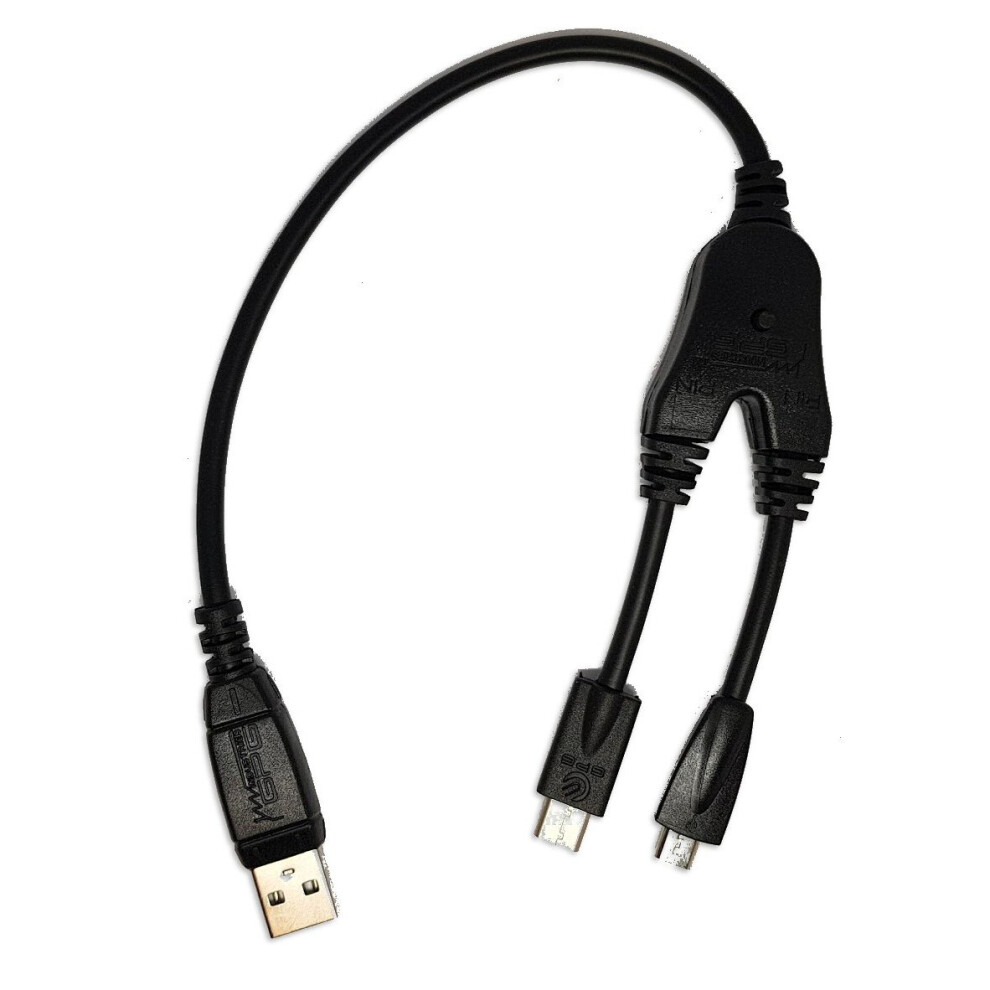
Miracle EDL Deep Flash Mode 9008 Cable For Miracle Dongle / Z3x / Octopus / FRP
In stock
Smart shoppers OnBuy it!
- Earn Cashback on every purchase – spend it instantly on your next order
- Free delivery – on millions of items across the site
- Customers love us – 139,000 Trustpilot reviews and an 'Excellent' rating
Interest-free payment options available


See full product description & details
Delivery: Standard (Free) | Mon 23rd - Tue 24th Nov
Sold by: FoneFunShop
Returns: 30 days
180-day payment protection
You might also like







Summary
- The Miracle EDL Deep Flash Mode 9008 Cable supports both USB Type C and MicroUSB connectivity.
- It is used on all Qualcomm phones to put phone into DEEP FLASH MODE, also known as Qualcomm 9008 Mode / Emergency Download Mode
- For Working With Miracle Thunder Dongle / Inferno Key Dongle / FRP Dongle / Z3x Box / Octopus Box etc
- This cable help you to Flash, unlock, read pattern lock for all kind of Qualcomm phones including Samsung, Sony, LG etc.
- Made from strong insulated wire with hard plastic around the connections
Miracle EDL Deep Flash Mode 9008 Cable For Miracle Dongle / Z3x / Octopus / FRP Description
Miracle EDL Deep Flash Mode 9008 Cable With Type-C Adapter For Miracle Dongle / Z3x / Octopus / FRP
The Miracle EDL Deep Flash Mode 9008 Cable supports both USB Type C and MicroUSB connectivity.
It is used on all Qualcomm phones to put phone into DEEP FLASH MODE, also known as Qualcomm 9008 Mode / Emergency Download Mode
For Working With Miracle Thunder Dongle / Inferno Key Dongle / FRP Dongle / Z3x Box / Octopus Box etc.
This cable help you to Flash, unlock, read pattern lock for all kind of Qualcomm phones including Samsung, Sony, LG etc.
What is deep flash / Qualcomm 9008 Mode ?
If a faulty handset can enter FASTBoot mode through the volume down key and the power button combinations but the driver can be recognized normally.
Then you need deep flash mode to enable you to connect to the phone and work with it. This cable witll put the phone in the needed Qualcomm 9008 Deep Flash Mode.
How to use EDL Deep Flash Qualcomm 9008 2-in-1 Cable
1. Take out the battery of the faulty phone.
2. Connect phone to the computer with the EDL Cable.
3. Conduct the deep flash point as explained with your flasher box.
4. Manually guide windows to force / use the underlying driver of the chip to work.
5. Once driver is installed, your computer will assign the needed USB port to the phone, and you can begin working on the phone.
Details
| OPC | P52XBCD |
|---|---|
| Codes | 7437135927996 (EAN) |
Detailed Product Information
| Weight | 0.03kg |
|---|---|
| Weight | 0.03kg |
Customers also buy
Compare Sellers for Miracle EDL Deep Flash Mode 9008 Cable For Miracle Dongle / Z3x / Octopus / FRP
- New from £11.99
| Seller | Ratings | Warranty | Returns | Price | Delivery | Total | Quantity |
|---|---|---|---|---|---|---|---|
| (225 reviews) | 3 months |
30 Days
Free Returns No
|
£11.99
|
+Fast & Free Delivery
Est. Delivery:
23rd-24th Nov
|
£11.99
|
Earn as you shop with instant Cashback on everything.
No catch, no cost
- Paid into your OnBuy account
- Spend it on your next purchase
- Save it or withdraw it
Become a Cashback VIP
Just 1 purchase unlocks bigger deals & rates