





















Product Images

Sorry, this item is temporarily out of stock.




Would you like us to let you know when it's back?
Summary
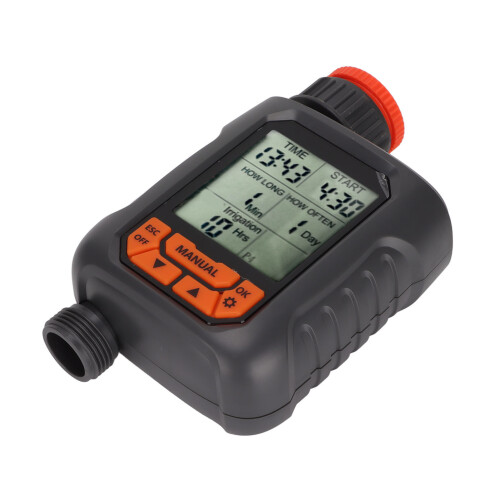
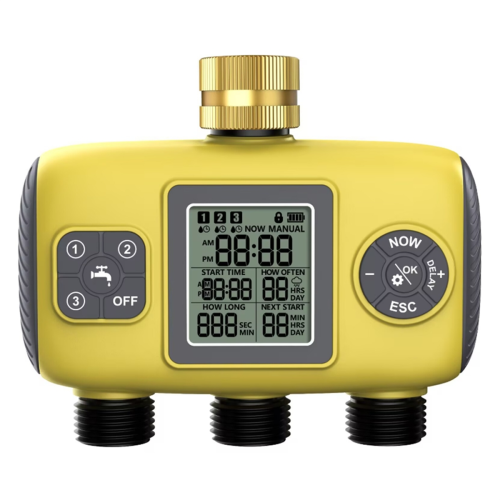
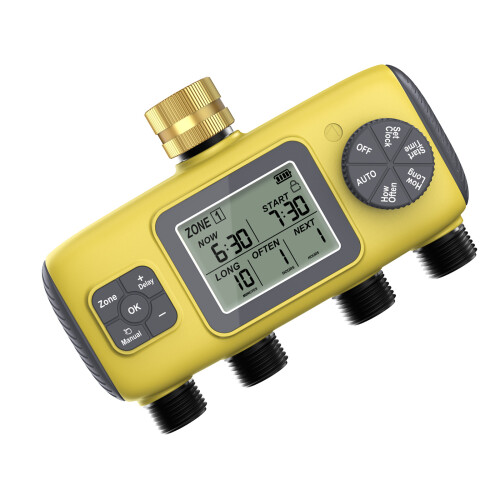
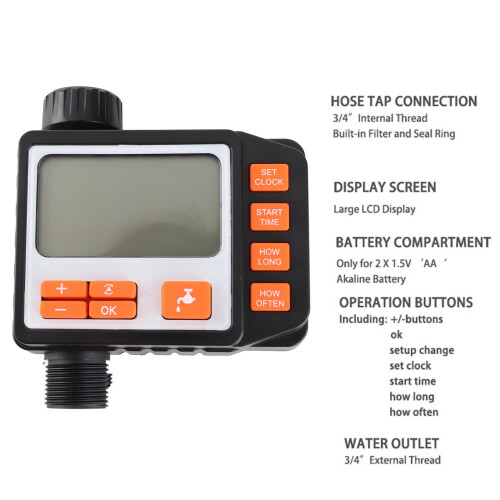
G3/4 Sprinkler Timer IP65 Waterproof Large LCD Display Digital Irrigation Controller with Copper Adapter
Item Type: Sprinkler Timer
Material: ABS
Product Size: Approx. 15.8 x 9 x 5cm / 6.2 x 3.5 x 2in
Weight: Approx. 349g/12.3oz
Battery (Delivered Without Battery): 1.5V, 2 x AA Battery
Tap Connection: G3/4 Female Thread
Outlet: G3/4 Male Thread
Applicable Water Pressure: 1-8kg/2.2-17.6lb
Working Flow: 500-1700L/hWater Temperature: 1-50
Power Consumption: <1W
Working Pressure: 0.2-0.8MPa
Waterproof Grade: IP65
Note: The orange connector on the internal thread of the irrigation controller is removable. After disassembly, the host interface is G1 female thread, and the orange connector is G3/4 female thread after installation.
Applicable to: Automatic Control Products for Courtyards, Balconies, Family Green Wall, 3D Greening Micro Sprays, Droppers, and Infiltration Irrigation.
Setup Steps:
1、For the first time, press "ESC, off" to enter "time" to set the current time, press "Up" or "Down" to set the hour, press "setup, OK" and then press "Up" or "Down" to set the minute, and then press "setup, OK" once to end the setting.
2、Automatically enter "start" to set the opening time, press "Up" or "Down" to set the hour, press "setup, OK" and then press "Up" or "Down" to set the minute, and then press "setup, OK" again to end the setting.
3、Automatically enter "how long" to set the watering duration, ranging from 1 minute to 599 minutes, the maximum is 9 hours and 59 minutes. Press "Up" or "Down" to set, and press "setup, OK" once to end the setting.
4、Automatically enter "how of ten" to set the watering frequency, with an interval of 1-30 days, press "Up" or "Down" to set, and press "setup, OK" once to end the setting.
5、If manual temporary watering is required, press "manual" and then press "Up" or "Down" to set the watering duration, and press "setup, OK" once to complete the setting. To stop watering manually, press "ESC, off" to start the automatic mode.
6、When there is no setting on the full screen (relevant setting items do not flash), press "Up" or "Down" to view the four timing programs from "P1" to "P4"; press "setup, OK" at any time to set the timing.
7、All setting interfaces automatically complete the setting after 8 seconds
Details
| OPC | PPTKF65 |
|---|---|
| Codes | 9481375791631 (EAN) |
Would you like us to let you know when it's back?
G3/4 IP65 Waterproof Digital Sprinkler Timer with Large LCD & Copper Adapter
You'll only get instant Cashback at OnBuy! Enter your email below and we'll send you a copy of your basket to save you time later.
By entering your email address, you'll automatically be added to our database, where you can enjoy personalised Cashback offers and early access to our best deals. You can opt out of our emails at any time and we'll never share your details with anyone. Check our Privacy Policy and T&Cs to find out more.
Want access to personalised offers and the highest Cashback rates? Sign up to our emails below.
You can opt out of our emails at any time and we'll never share your details with anyone. Check our Privacy Policy and T&Cs to find out more.
This page has expired.
Refresh and continue