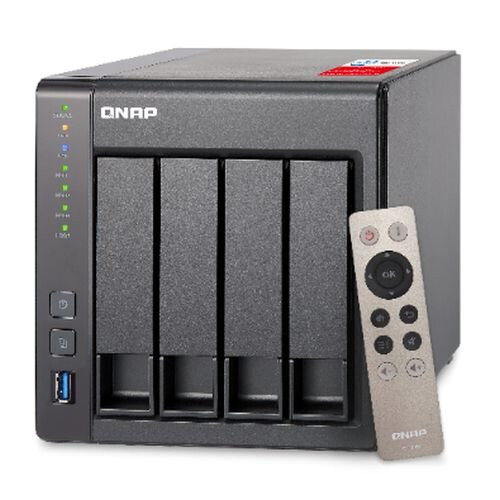
- Centralize your file storage, sharing and backup with excellent
performance
- Run multiple Windows®, Linux®, UNIX® and
Android™ based virtual machines with the Virtualization
Station
- Operate multiple isolated Linux® systems as well as
download containerized apps with Container Station
- Enjoy the best audio-visual experience with HDMI output and the
free remote control
- Transcode Full HD videos on-the-fly or offline*
- Stream multimedia files via DLNA®, AirPlay®,
Chromecast™ and Bluetooth® with multi-zone multimedia
control
- Quickly find specific files by real-time, natural search with
Qsirch
- Scale up to 12 drives with QNAP UX-800P expansion
enclosure
Facing the increasing demand for data storage, sharing and
multimedia processing, more and more users are looking for a NAS
system with good performance and an affordable price tag. The
Intel® quad-core TS-451+ provides an uncompromising
high-performance scalable storage solution for professional users.
Powered by the intelligent QTS 4.2 operating system, the TS-451+
performs as an easy-to-use yet powerful NAS for data backup, file
synchronization and sharing, remote access and multimedia
applications, and is ideal for users to create a secure private
cloud to access their data easily.
Quad-core 64-bit Intel® Celeron® CPU for
exceptional performance
The TS-451+ is powered by a 64-bit Intel® Celeron®
quad-core 2.0GHz processor and has 2GB energy-efficient DDR3L RAM
(upgradable to 8GB) and dual Gigabit LAN ports, delivering up to
225 MB/s read & write speeds with port trunking mode. The
TS-451+ can also automatically increase the processor's clock
rate from 2.0GHz to 2.42GHz when needed for CPU-intensive tasks.
The TS-451+ supports AES 256-bit volume & folder encryption
with transfer speeds of up to 204 MB/s, boosting system performance
& security while ensuring the safety of sensitive personal data
stored in the TS-451+.
QTS 4.2 - Simple and efficient
Thanks to the intuitive user interface of QTS 4.2, your NAS
experience is smarter, smoother and spectacular. Its modern flat
design streamlines loading times, and the intelligent desktop
allows you to quickly find desired functions, create desktop
shortcuts or group shortcuts, monitor important system information
on a real-time basis, and open multiple application windows to run
multiple tasks concurrently, bringing greater operating efficiency.
QTS breaks the barriers of devices, platforms and geography to
bring optimized cloud experiences to you, and incorporates more
advanced features including volume/LUN snapshot, remote connection
to public cloud services in File Station, multi-zone multimedia
system, and more.
Run additional operating systems on the
TS-451+
The Virtualization Station transforms the TS-451+ into a
2-in-a-box NAS that can function as an all-in-one NAS and a
virtualization platform that supports multiple operating systems,
fast VM creation, VM backup & restoration, VM import/export,
snapshot, Device Management for centrally managing VM, and enables
desktop operations on web browsers. With the easy-to-use interface,
you can centrally manage all of the VMs created on the TS-451+ with
minimal effort. You can also download VMs on demand from online VM
markets and import them to the TS-451+ without any complex
procedures.
Container Station – LXC and Docker® Containers
inclusive
QNAP Container Station exclusively integrates LXC and
Docker® lightweight virtualization technologies, allowing you
to operate multiple isolated Linux® systems on the TS-451+ as
well as download apps from the built-in Docker Hub® Registry.
It supports container import/export and permission settings, and
features an informative dashboard and flexible user interface for
you to manage multiple containers. You can experience the amazing
Container Station and enjoy the playground of virtual containers
with the TS-451+. Container Station also supports Online Document
app, which allows you to directly view, edit and store files of
various types anytime on your NAS, including Office documents,
images and text files.
Real-time & offline video transcoding
The TS-451+ delivers superior real-time video transcoding (up
to 4K H.264) to convert your videos to formats that can be smoothly
played on PCs, mobile devices and Smart TVs. It allows for multiple
devices to simultaneously view different videos stored on the
TS-451+ with on-the-fly hardware accelerated transcoding, saving
your time in converting videos to different formats for different
devices.
With the benefits of offline transcoding, if you can only
connect to an Internet connection with limited/restricted
bandwidth, you can still enjoy smooth videos via File Station,
Video Station, or the Qfile app by selecting a pre-rendered
lower-resolution video, saving system resources of the TS-451+ for
other applications. The TS-451+ also allows you to set a dedicated
folder for automatic video transcoding.
Enjoy media freely with multi-zone multimedia
control
Use your TS-451+ as a multi-zone multimedia system to fill
every corner of your house with your choice of media. You can
centrally manage and stream photos, music and videos from the
TS-451+ to different rooms from a single device using
Bluetooth®& USB devices connected to the TS-451+ (for music
streaming only), HDMI, DLNA®, Apple TV® and
Chromecast™*. Every room member in different zones can enjoy
the convenience and simplicity for media playback and multimedia
storage.
Alternatively, to enjoy multimedia yourself, you can choose
DLNA-compatible devices, use the Qfile app on an iOS® device to
browse videos/photos and play on the TV via Apple TV®, or
transform the TS-451+ into a powerful streaming machine with
DLNA®, Roku®, Amazon® Fire TV, and Google TV™
support with the support of Plex Media Server.
Qsirch – A smarter, faster way to
search
Quickly and easily find documents, photos, videos, and music
with Qsirch, QNAP's new built-in NAS search application lets
you find what you need by real-time, natural search. Simply type in
as much as you know about what you are trying to find, including
parts of the file name or even words/phrases in the document, and
Qsirch will display a list of matches, complete with thumbnails, as
you type. Qsirch even remembers your search history so you can
quickly navigate to files you've previously searched for.
Qsirch is a huge productivity boost that greatly reduces the amount
of time spent looking for files on the NAS so you can focus on
other tasks.
Cross-platform file sharing, centralized data
storage
The TS-451+ supports SMB/CIFS, NFS, and AFP protocols for file
sharing across Windows®, Mac® and Linux®/UNIX®.
Data, logs and ISO image of CDs and DVDs can be centrally stored in
the TS-451+ and protected by an integrated antivirus
solution.
File Station integrated with cloud services
The web-based File Station enables you to easily upload,
download, and manage files on your TS-451+ wherever there is an
internet connection. Supporting file extraction, folder creation,
and smart search for files and folders, the File Station also
allows you to easily share files with colleagues and friends via
unique URLs, email, and a shared space. What's even better, you
can also directly browse and transfer files between the TS-451+ and
public cloud services like Google Drive™, Dropbox®,
Microsoft® OneDrive, Box®, Yandex® Disk and Amazon®
Cloud Drive through File Station, and view files with Office Online
and Google Docs™ or directly open them with a Google
Chrome™ office extension.
Well-rounded backup solutions to secure
data
QNAP NetBak Replicator supports real-time and scheduled data
backup on Windows including Outlook email archiving. Apple Time
Machine® is also supported to provide Mac® OS X users with
a solution to effortlessly back up data to the TS-451+. The front
panel USB 3.0 port on the TS-451+ features a one-touch-copy
function for you to instantly back up data on external drives to
the TS-451+ with just one click, or alternatively to back up data
from the TS-451+ to external drives. A wide range of third-party
backup software such as Acronis® True Image and Symantec®
Backup Exec are also supported.
Disaster recovery solutions bring peace of
mind
The TS-451+ offers various data recovery options. RTRR
(Real-Time Remote Replication) supports real time and scheduled
data backup to remote QNAP NAS or FTP servers and synchronizes
files to remote folders from local folders with better backup
efficiency. You can enjoy backup versioning to preserve a certain
amount of versions, with options of simple versioning to schedule
how many versions should be retained and for how long, or smart
versioning with a rotation scheme that automatically replaces
earlier backup versions. The TS-451+ also supports rsync protocol
to back up data to remote servers on a scheduled basis. Data can
also be backed up to and restored from a range of cloud storage
services, including Amazon® S3, Amazon® Glacier,
Microsoft® Azure™, ElephantDrive®, Dropbox®,
Google Drive™, Google Cloud Storage™, and more.
Volume & LUN snapshot simplifies
restoration
Not limited to high-end models, the TS-451+ brings the
highly-anticipated snapshot function for your flexible usage.QTS
Storage Manager adds an easy-to-use web-based snapshot tool for you
to easily back up and restore data on the TS-451+ back to any point
of time to prevent loss of important data. You can take up to 256
snapshots per volume or LUN, efficiently replicate volume/LUN
snapshots to remote servers by copying only the changes made, and
quickly clone a volume /LUN snapshot as a local volume without
interrupting the current system operation. You can even set up the
system to automatically take a snapshot of the volume before backup
via RTRR/rsync, even when the file is opened.
Comprehensive security options
In open network environments, data on the connected devices
may be exposed in a potential hack. The TS-451+ provides numerous
security options, such as 2-step verification, encrypted access, IP
blocking, and more. Administrators can also control the access
rights of each user to different folders, preventing unauthorized
access to important files. The TS-451+ is validated with
military-level FIPS 140-2 AES 256-bit encryption, preventing
sensitive data from unauthorized access and breach even if the hard
drives or the entire system were stolen.
Secure access with VPN Server & VPN
Client
The TS-451+ can be a VPN server with L2TP/IPsec, OpenVPN, and
PPTP support, allowing you to securely access data shared within
the private local network. The TS-451+ also supports VPN Client for
PPTP and OpenVPN to protect your privacy during data
transmission.
File synchronization across devices and
clouds
Qsync utility turns your TS-451+ into a safe, large-capacity
data center for file synchronization. Any file uploaded to the
TS-451+ will be made available for all linked devices, such as
computers, laptops or mobile devices. Qsync is especially useful
for frequent travelers to manage files and always have the most
up-to-date files on different devices. Qsync provides multiple ways
of file synchronization and group file sharing, greatly enhancing
the flexibility of team projects and collaboration. It also
supports centralized configuration, and allows you to remotely
erase the Qsync folder on a lost device to avoid data breaches, and
even restore it after you have retrieved the device. You can also
install the Cloud Drive Sync app from QTS App Center to easily sync
files with Google Drive™ and Dropbox® cloud
storage.
Comprehensive surveillance solution providing 24/7
security
The TS-451+'s Surveillance Station offers a professional
surveillance solution with a user-friendly management interface, a
wide range of over 3,000 compatible IP camera models, and
expandable IP camera channel licenses. It supports real-time
monitoring, video & audio recording and playback with a wide
range of customizable settings. You can also install the Vmobile
app on your iOS® or Android™ devices to manage the
monitoring of cameras anytime, anywhere, to safeguard your office
environment, or install the Vcam mobile app to turn your device
into a network camera to instantly record to your TS-451+. The
TS-451+ offers 2 free IP camera channels and you can expand up to
40 channels by purchasing additional licenses.
Access and enjoy with your mobile devices
The TS-451+ is your private cloud storage that virtually
enlarges the capacity of your smart mobile devices. Qfile allows
you to access, upload, download, manage, and share stored files
easily as if you are carrying tons of files in your pocket. If
Qfile is installed on an iOS® device, users can also browse
videos & photos stored on the TS-451+ and play on a TV via
Apple® TV. Qmanager lets you monitor & manage the TS-451+
remotely and efficiently without turning on your PC. You can take
and share digital notes with Qnotes, and enjoy and share music,
photos and videos on the TS-451+ anywhere and anytime with Qmusic,
Qphoto and Qvideo apps.
Install-on-demand apps to extend NAS
functionality
The TS-451+ has a built-in App Center that provides various
install-on-demand apps developed by QNAP and third-party
developers, including tools for backup/sync, business, content
management, communications, download, entertainment, and much more.
It is also a centralized location for managing & updating
installed apps. In addition, QNAP's development platform
embraces the open-source spirit to enable developers to create
their own apps, adding potentially limitless potential for the
TS-451+.
LED indicators with adjustable brightness
controls
With adjustable 3-stage brightness controls for LED
indicators, the TS-451+ provides flexible LED brightness options.
Based on the surrounding environment, you can adjust the brightness
of all system indicators and also schedule the system to
automatically dim the LEDs at certain times when needed.
Expand storage capacity easily
The TS-451+ supports online capacity expansion for archiving
rapidly growing data by connecting a QNAP expansion enclosure. With
the QNAP scale-up solution, the raw storage capacity can be
expanded on demand*, making the TS-451+ an ideal file center with
large storage capacity for storage-intensive business
applications.
With the support of QJBOD Express (JBOD enclosures roaming)**,
you can just connect a large capacity QNAP expansion enclosure to
the TS-451+, and migrate data to another NAS through the JBOD
enclosure without network connectivity.
Energy-saving & eco-friendly
The TS-451+ utilizes a 22nm CPU and DDR3L RAM which feature
low voltage, low power consumption, maintaining high performance in
system operations with the benefit of energy-saving. Other
eco-friendly designs include S3 sleep mode, HDD standby, scheduled
power on/off, hard disk standby mode, and Wake on LAN. QNAP also
packs the TS-451+ in an eco-friendly box to minimize the
environmental impact.
Easy-to-use NAS management tools
The TS-451+ provides comprehensive system tools to increase
management efficiency.