





















Sorry, this item is temporarily out of stock.
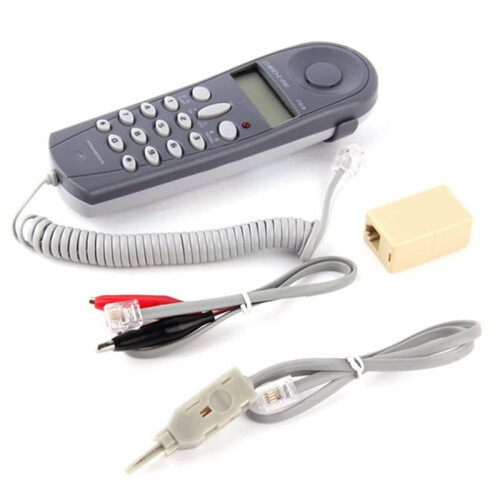
Telephone Phone Network Cable Tester Butt Test Tester Lineman Tool Cable Set Cable Inspection and Testing Machine
Similar Products we think you'll like
















Would you like us to let you know when it's back?
Summary
- Installation Instructions Special Note: You must apply for caller ID service activation at your local telephone exchange before the device can receive incoming calls. 1. The telephone should be installed in a dry, well-ventilated place free from corrosive gases, Plug one end of the telephone line into a line access point or other connection socket.
- Instructions for Use 1. Answer the phone when it rings. If caller ID service is activated, the display will show the caller's number. Press the "On/Off" button to hang up. 2. Dialing: After picking up the phone, press the "On/Off" button; the indicator light will illuminate. After hearing the dial tone, you can dial.
- If you hear a busy tone after dialing, press the "Answer Line" button; the phone will be answered automatically. After hearing the dial tone, simply press the "Answer" button to redial the number. After the call ends, press the "On/Off" button; the indicator light will turn off.
- Network Cable Set
- Test cable inspection machine
Telephone Phone Network Cable Tester Butt Test Tester Lineman Tool Cable Set Cable Inspection and Testing Machine Description
Installation Instructions Special Note: You must apply for caller ID service activation at your local telephone exchange before the device can receive incoming calls. 1. The telephone should be installed in a dry, well-ventilated place free from corrosive gases, Plug one end of the telephone into a access point or other connection socket.
Instructions for Use 1. Answer the phone when it rings. If caller ID service is activated, the display will show the caller's number. Press the "/Off" button to hang . 2. Dialing: After picking the phone, press the "/Off" button; the indicator light will illuminate. After hearing the dial tone, you can dial.
If you hear a busy tone after dialing, press the "Answer " button; the phone will be answered automatically. After hearing the dial tone, simply press the "Answer" button to redial the number. After the call ends, press the "/Off" button; the indicator light will turn off.
Color: As Shown
Material: ABS
Package Contents:
1 * telephone 1 * alligator clip 1 * junction box 1 * cloning strip
Details
| OPC | PVB7QXY |
|---|---|
| Brand | Jojomino |
| Codes | 4713062095544 (EAN) |
Product Data
| Height | 5cm |
|---|---|
| Width | 6cm |
| Length | 16cm |
| Weight | 0.132kg |
| Colour | As Shown |
| Material | ABS |
Would you like us to let you know when it's back?
Telephone Phone Network Cable Tester Butt Test Tester Lineman Tool Cable Set Cable Inspection and Testing Machine
You might also like