





























Product Images

Sorry, this item is temporarily out of stock.
Would you like us to let you know when it's back?
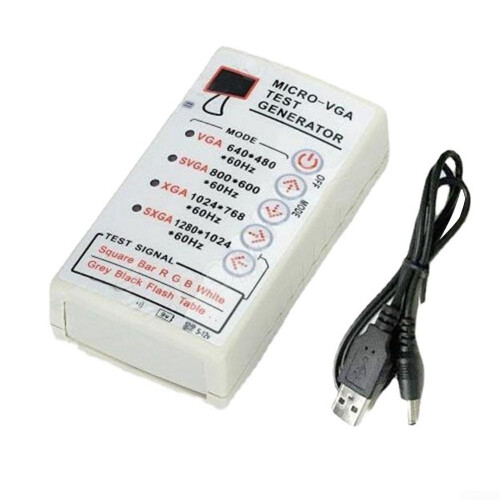
Comprehensive signal detection The SXGA Display Signal Generator is essential for diagnosing display defects in monitors. It helps you identify whether the issue lies with the host device or the monitor itself, enabling faster and more accurate repairs. Supports multiple display types Compatible with LCD monitors, CRT color monitors, and projectors, making it a versatile tool for various and detection tasks. Four resolution modes Provides four common VGA resolution modes: 640x480, 800x600, 1024x768, and 1280x1024. You can easily switch between settings to match testing requirements. Easy operation Simply connect the 15 pin connector to your display to power on, then select signals with the intuitive buttons for straightforward operation. Use scenarios In a, quickly determine whether a display issue is caused by the host computer or the monitor, reducing diagnostic time. Onsite service visits, verify that a display from different devices (laptops, desktops, projectors) works correctly with the proper resolution, avoiding unnecessary replacements. During refurbishing or QC, test multiple display types (LCD, CRT, projector) and resolutions to ensure compatibility and performance before final.
Details
| OPC | PQ6C26X |
|---|---|
| Codes | 9094768624838 (EAN) |
Would you like us to let you know when it's back?
VGA XGA Generator For Display Devices With Standard VGA Output Connections, XGA Resolution Support
You'll only get instant Cashback at OnBuy! Enter your email below and we'll send you a copy of your basket to save you time later.
By entering your email address, you'll automatically be added to our database, where you can enjoy personalised Cashback offers and early access to our best deals. You can opt out of our emails at any time and we'll never share your details with anyone. Check our Privacy Policy and T&Cs to find out more.
Want access to personalised offers and the highest Cashback rates? Sign up to our emails below.
You can opt out of our emails at any time and we'll never share your details with anyone. Check our Privacy Policy and T&Cs to find out more.
This page has expired.
Refresh and continue