






















Product Images

Sorry, this item is temporarily out of stock.









Would you like us to let you know when it's back?
Summary
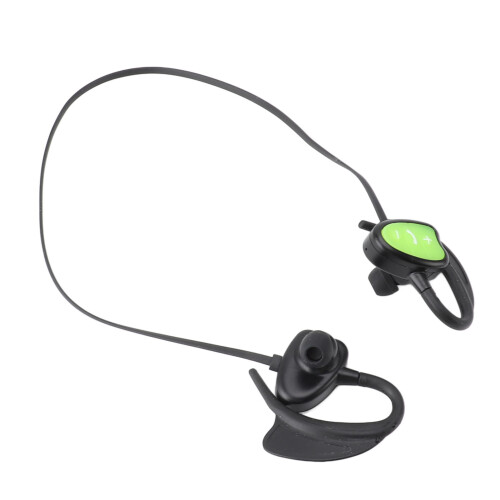
Swimming Headphone Bluetooth Wireless IPX8 Waterproof Intelligent Voice Prompt Noise Reduction Sports Headphone for Surfing Diving Green
Item Type: Swimming Bluetooth Headphone
Material: Silicone
Weight: Approx. 55g / 1.9oz
Battery: Lithium ion battery DH601230 180MAH (built in)
Suitable for: Adults
Model No: LAE 802
Bluetooth Version: 5.0
Charging Current: 100mA
Charging Voltage: 4.75-5.75V
Operating Voltage: 3.3-4.2V
Distortion Level: 0.1%
Frequency: 2.40GHz-2.48GHz
Support Protocol: HSP, HFPA2 DP, AVRCP etc.
Receiving Sensitivity: -92dBm
Receiving Distance: 10m / 32.8ft
Whether Single Or Binaural: Bilateral stereo
Waterproof Performance: IPX8
Switch On Off:
Power On: Long press the power button for 3 seconds, the indicator light is on, the headphone voice prompts, the machine is turned on.
Power Off: Long press the power button for 3 seconds, the indicator light will go out, the headphone voice prompts, the machine is turned off.
Dual Voice:
In the Bluetooth waiting for pairing state, double click the answer button.
Bluetooth Connection:
3.3.1 Power on the phone to enter pairing mode, the indicator light flashes, the headset enters the Bluetooth pairing state.
3.3.2 Turn on your cell phone Bluetooth, search for LAE 802, select and pair.
3.3.3 Bluetooth pairing is complete, you can use the headset to listen to music, phone calls and other operations.
Note: When the headset has been paired with the device once, it will be paired by itself for the second time. If you don't need to pair with the device, you can manually disconnect the Bluetooth connection after you finish using it.
Call Status:
3.4.1 Answer An Incoming Call: When an incoming call comes in, press the power button briefly to answer the call.
3.4.2 Reject Call: When the call comes, long press the power button for 2 seconds to reject the call.
3.4.3 End Call: During a call, press the power button briefly to end the call.
3.4.4 Last Number Redial: When you are on standby or playing music, double press the power button, the headset will dial the last dialed phone number of the cell phone.
Playing Music:
3.5.1 When you are in standby, press the power button briefly or operate the music player on the phone to play music.
3.5.2 When the music is playing, press the power button briefly, the music will pause, press the power button briefly again, the music will play.
3.5.3 When the music is playing, long press the volume up key to adjust the volume up, long press the volume down key to adjust the volume down.
3.5.4 When the music is playing, short press the volume up key to select the next song. Short press the volume down button to select the previous song.
Details
| OPC | PJDNBCJ |
|---|---|
| Codes | 6941335258060 (EAN) |
Would you like us to let you know when it's back?
Wireless Diving Headphones Bluetooth IPX8 Waterproof Noise Reduction Green
You'll only get instant Cashback at OnBuy! Enter your email below and we'll send you a copy of your basket to save you time later.
By entering your email address, you'll automatically be added to our database, where you can enjoy personalised Cashback offers and early access to our best deals. You can opt out of our emails at any time and we'll never share your details with anyone. Check our Privacy Policy and T&Cs to find out more.
Want access to personalised offers and the highest Cashback rates? Sign up to our emails below.
You can opt out of our emails at any time and we'll never share your details with anyone. Check our Privacy Policy and T&Cs to find out more.
This page has expired.
Refresh and continue