





















Sorry, this item is temporarily out of stock.
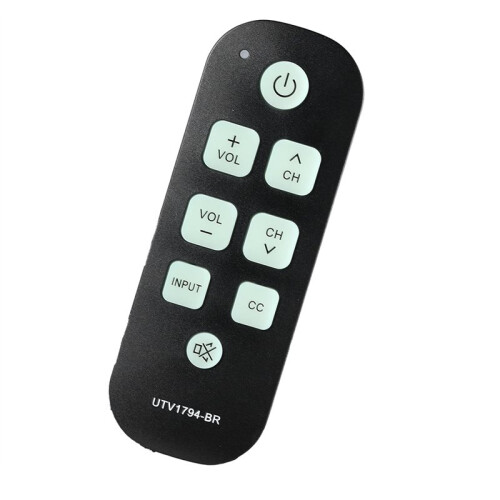
Backlight TV Remote for Seniors Universal Controller Simple Waterproof Remote Control with LED Light for All TV Model
Similar Products we think you'll like
Would you like us to let you know when it's back?
Summary
- For channel up and down and volume up and down, this big button TV remote is pre-programmed for LG, Panasonic and RCA TVs, Can be used directly. For other TV brands, you simply use your original remote to complete the learning. Remember: at the end of learning, press the [MUTE] and [VOL-] keys together to save.
- This remote control is designed only for television sets that use infrared technology; it will not work with RF, Bluetooth, or Magic Link style remotes. Please confirm that your TV operates via IR before purchasing to ensure compatibility.
- Step 1: Press the UTV1794-BR remote's [MUTE] and [VOL+] keys together until the LED stays on, entering learning mode. Step 2: Align your original remote and the UTV1794-BR head-to-head at 1-3 cm distance. Learn each button one by one. Step 3: Press a button on the original remote and slowly move it to find the angle where the LED flashes.
- Step 4: When the function key on your original remote is pressed, such as the power key, wait for the UTV1794-BR LED to flash, then press the matching key on the UTV1794-BR so the LED stays on. Step 5: Repeat for all desired keys. Step 6: When finished, and the LED is still on, press the [MUTE] and [VOL-] keys together to save.
- For Impaired Vision: This remote control for seniors features large character buttons, making it unnecessary to use reading glasses. It's a simple remote that is user-friendly for individuals with vision impairments. Enhance your viewing experience with our easy-to-use remote.
Backlight TV Remote for Seniors Universal Controller Simple Waterproof Remote Control with LED Light for All TV Model Description
For channel and down and volume and down, this button TV remote is pre-programmed for , and RCA TVs, Can be used directly. For other TV brands, you simply use your original remote to complete the learning. Remember: at the end of learning, press the [MUTE] and [VOL-] keys together to save.
This remote control is designed only for television sets that use infrared technology; it will not work with RF, , or Magic Link style remotes. Please confirm that your TV operates via IR before purchasing to ensure compatibility.
Step 1: Press the UTV1794-BR remote's [MUTE] and [VOL+] keys together until the LED stays , entering learning mode. Step 2: Align your original remote and the UTV1794-BR -to- at 1-3 cm distance. Learn each button one by one. Step 3: Press a button the original remote and slowly move it to find the angle where the LED flashes.
Step 4: When the function key your original remote is pressed, such as the power key, wait for the UTV1794-BR LED to flash, then press the matching key the UTV1794-BR so the LED stays . Step 5: Repeat for all desired keys. Step 6: When finished, and the LED is still , press the [MUTE] and [VOL-] keys together to save.
For Impaired Vision: This remote control for seniors features large character buttons, making it unnecessary to use reading glasses. It's a simple remote that is user-friendly for individuals with vision impairments. Enhance your viewing experience with our easy-to-use remote.
Color: As Shown
Material: plastic
Package Contents:
1*remote control
Details
| OPC | PTDZK8Z |
|---|---|
| Brand | Brecantia |
| Codes | 6032266537611 (EAN) |
| Links | Universal TV Remotes |
Product Data
| Height | 3cm |
|---|---|
| Width | 6cm |
| Length | 15cm |
| Weight | 0.0645kg |
| Colour | As Shown |
| Material | Plastic |
Would you like us to let you know when it's back?
Backlight TV Remote for Seniors Universal Controller Simple Waterproof Remote Control with LED Light for All TV Model
You might also like