






















Product Images

Sorry, this item is temporarily out of stock.






Would you like us to let you know when it's back?
Summary
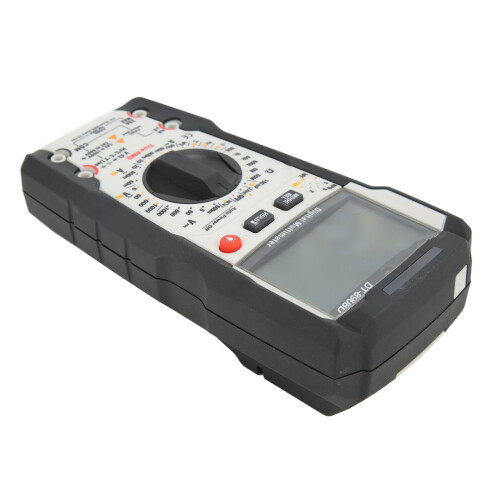
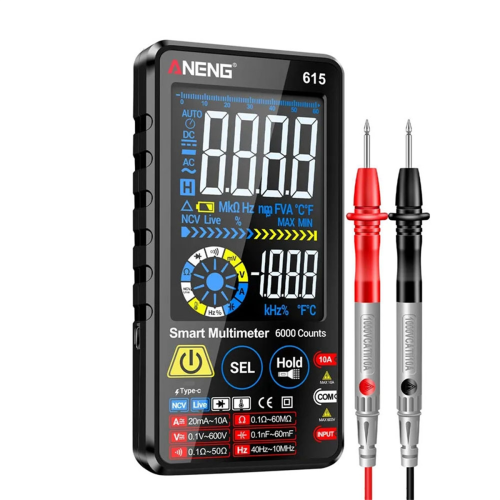
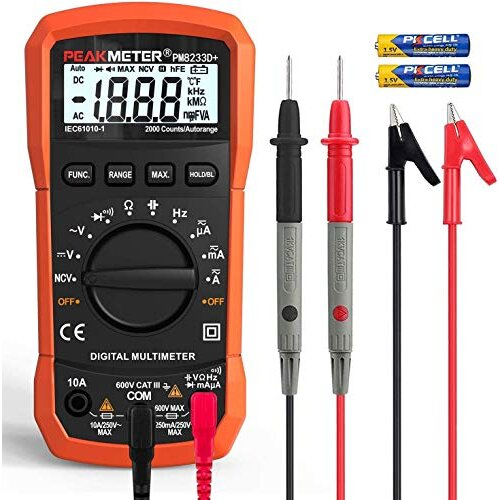
DT-8908D High Accuracy Multimeter Tester Portable Manual Range Burn Proof Industrial LCD Voltmeter
Item Type: Digital Multimeter
Model: DT-8908D
Material: ABS
Battery: 4x1.5V AAA Battery (Battery Not Included)
Purpose: It is suitable for electrical parameter measurement.
Display: 6000 Digit LCD Display
AC Response: True Effective Value Measurement
Fuse: 630mA/250V Fuse; 20A/250V Fuse
Polarity: Automatically Distinguish The Polarity, (-) Negative
Over Range: "OL" Display
Low Voltage Prompt: "Low Battery" Symbol Prompt
Automatic Shutdown: 15 Minutes of No Operation
Measuring Speed: 3 Times Per Second
Operating Environment: 0 to 40 (4 to 104) Relative Humidity <70%RH
Storage Temperature: -10 to 50 (14 to 122) Relative Humidity <80%
Maximum Indoor Use Height: 2000m
DC Voltage
600.0mV
0.1mV
0.5% of rdg8 dgts
6.000V
1mV
60.00V
10mV
0.7% of rdg5 dgts
600.0V
100mV
0.7% of rdg8 dgts
1000V
1V
AC Voltage
6.000V
1mV
1.2% of rdg5 dgts
60.00V
10mV
600.0V
100mV
1000V
1V
DC Current
60.00uA
0.01uA
1.0% of rdg5 dgts
60.00mA
10uA
600.0mA
100uA
1.2% of rdg8 dgts
20.00A
10mA
2.0% of rdg10 dgts
AC Current
60.00mA
10uA
1.0% of rdg5 dgts
600.0mA
100uA
1.2% of rdg8 dgts
20.00A
10mA
2.0% of rdg10 dgts
Resistance
600.0Ω
0.1Ω
1.0% of rdg5 dgts
6.000kΩ
1Ω
1.5% of rdg5 dgts
60.00kΩ
10Ω
600.0kΩ
100Ω
6.000MΩ
1kΩ
2.5% of rdg8 dgts
60.00MΩ
10kΩ
Capacitance
60.00nF
10pF
2.5% of rdg8 dgts
600.0nF
0.1nF
3.0% of rdg8 dgts
6.000μF
1nF
60.00μF
0.01μF
3.5% of rdg10 dgts
600.0μF
0.1μF
6.000mF
1μF
60.00mF
10μF
5.0% of rdg10 dgts
100.0mF
100μF
How e:
DC Voltage Measurement:
Note: Do not perform measurement at the moment when the power is turned on or off, as high voltage may damage the meter.
1. Place the function dial at the VDC (range: 600mV, 6V, 60V, 600V, 1000V) position;
2. Insert the black test lead into the negative COM port and the red test lead into the positive V port;
3. Touch the tip of the test lead to the test object to ensure that the electrode is correct (red connects the positive electrode, and black connects the negative electrode);
4. Read the voltage value on the display. When it is greater than 30V, the LCD will display a high voltage danger symbol. When it is greater than 1000V, the buzzer will sound.
The red light is always on. If the electrode is reversed, a minus sign will be displayed before the value.
AC Voltage Measurement:
Warning: Please observe all safety precautions when measuring on wires with wires.
Note: Do not perform measurement at the moment when the power is turned on or off, as high voltage may damage the meter.
1. Set the function dial to VAC/HZ (range: 6V, 60V, 600V, 1000V);
2. Insert the black test lead into the negative COM port and the red test lead into the positive/port;
3. Touch the tip of the test lead to the test object;
4. Read the voltage value on the display. When it is greater than 30V, the LCD will display a high voltage danger symbol. When it is greater than 1000V, the buzzer will sound and the red light will be on;
5. Short press the MODE button to enter the AC voltage frequency measurement mode, the measurement range is 45Hz~1KHz.
DC Current Measurement:
Note: The measurement time cannot exceed 10 seconds under the condition of 20A, otherwise the meter or test leads may be damaged. During the measurement, if the current cannot be estimated, the measurement should be started from the high range, and if necessary, the low range should be selected.
1. Insert the black test lead into the negative COM port;
2. Measure the current below 600mA DC, set the function dial to DC 60uA or mA (range: 60mA, 600mA), and insert the red test lead into the mA port;
3. When measuring DC 20A, set the function dial to the 20A gear and insert the red test lead into the 20A port;
4. Disconnect the power supply of the tested circuit, touch the black test lead to the negative pole of the tested circuit, and the red test lead to the positive pole of the tested circuit;
5. Turn on the power supply;
6. Read the current value on the display. When it is greater than 10A, the buzzer will sound and the red light will stay on.
AC Current Measurement:
Warning: To prevent electric shock, do not measure on a circuit with a voltage exceeding 250V.
Note: The measurement time cannot exceed 10 seconds under the condition of 20A, otherwise the meter or test leads may be damaged. During the measurement, if the current cannot be estimated, the measurement should be started from the high range, and if necessary, the low range should be selected.
1. Insert the black test lead into the negative COM port;
2. When measuring 600mA, put the function keyboard in the AC 60mA, 600mA gear position, and insert the red test lead into the mA port;
3. When measuring 20A, place the function keyboard in the 20A position and insert the red test lead into the 20A port;
4. Disconnect the power supply of the tested circuit, touch the black test lead to the negative pole of the tested circuit, and the red test lead to the positive pole of the tested circuit;
5. Turn on the power supply;
6. When the current value read on the display is greater than 10A, the buzzer will sound and the red light will stay on;
7. Short press the MODE tank to enter the AC current frequency measurement mode, the measurement range is 45Hz~1KHz.
Details
| OPC | PMR8DNN |
|---|---|
| Codes | 7901357996622 (EAN) |
| Links | Multimeters |
Would you like us to let you know when it's back?
DT-8908D High Precision 1000V Multimeter with LCD & IP67 Protection
You'll only get instant Cashback at OnBuy! Enter your email below and we'll send you a copy of your basket to save you time later.
By entering your email address, you'll automatically be added to our database, where you can enjoy personalised Cashback offers and early access to our best deals. You can opt out of our emails at any time and we'll never share your details with anyone. Check our Privacy Policy and T&Cs to find out more.
Want access to personalised offers and the highest Cashback rates? Sign up to our emails below.
You can opt out of our emails at any time and we'll never share your details with anyone. Check our Privacy Policy and T&Cs to find out more.
This page has expired.
Refresh and continue